 AroFlo
 Fergus
 Simpro
 Tradify
Review
ServiceM8 review (2026): what it does, what it really costs, and who it suits
ServiceM8 reviewed for Australian and NZ tradies: pricing by job volume, the new Android app in ServiceM8 15, card fees after the surcharge ban, Xero, and who it suits.
By Dan Edwards · Updated
Some links on this page earn a commission if you sign up. It never changes the order or the verdict. How we keep the lights on.
On this page
- What is ServiceM8?
- ServiceM8 pricing in Australia (2026)
- ServiceM8 15 new features, including Office Agent AI
- ServiceM8 setup: four defaults to fix first
- The ServiceM8 app on iPhone and Android
- Getting website enquiries into ServiceM8
- ServiceM8 Xero integration, API and add-ons
- ServiceM8 downsides, support and backups
- ServiceM8 vs Tradify
- Who is ServiceM8 best for?
- ServiceM8 FAQs
We used ServiceM8 on a 14-day trial from 29 October 2026, with ServiceM8 15 switched on: the web dashboard on a Mac, the app on an iPhone, and the Android app on an Android emulator. We set up a made-up Brisbane plumbing business, quoted a job, had the “customer” accept it online, booked it, ran it on the phone and invoiced it. We also connected it to a Xero demo company, tried Office Agent and asked support two questions.

Short answer
ServiceM8
ServiceM8 is the best value job app for small Australian trade teams doing lots of short jobs. You pay per business, not per person, it works fully offline, and it connects well to Xero.
From A$29 a month inc GST
Starter, for 50 new jobs a month. Every paid plan is one price for the business with unlimited users: Growing is A$79 for 150 jobs and Premium A$149 for 500. Free covers 30 jobs a month for one user.
Why pick it
- One price for the whole business, so adding a third or fourth person costs nothing.
- Works fully offline on the phone and syncs when you're back in range.
- Quick from quote to invoice, and what the customer sees (the online quote, the "on the way" text, the invoice link) looks professional.
- Invoices reached Xero in under a minute in our test, and payments came back in under five.
- The lowest card fees of the small-team apps on paid plans.
- A public API, webhooks and Zapier, so your website form and other software can create jobs.
Trade-offs
- No purchase orders or stock control. A deal-breaker if you order materials for each job or carry stock in the van. Simpro and AroFlo do both; Fergus and Tradify do purchase orders on their dearer plans.
- No Gantt charts or retentions. It's built for one visit, one job, one invoice. For long projects, look at AroFlo for Gantt charts, or Simpro or Tradify Pro for retentions.
- No phone support. Help is 24/7 chat and email only. Tradify has a phone line and includes setup and training.
- The price climbs with job numbers. Above 150 new jobs a month you need Premium, A$135.45 ex GST. One or two people doing lots of small jobs can pay less per user: two on Tradify Pro is A$104 ex GST.
SFT score breakdown6 parts
- Price and value9
25% of the score. One price for the whole business, cheapest per person in every team size we priced, and the lowest card fees of the small-team apps on paid plans. The price jumps when you cross a job limit.
- Quote to invoice8.5
25% of the score. Quick, works offline, and looks professional to the customer. No purchase orders, stock or long-project tools.
- Setup6.5
10% of the score. Signing up takes a minute, but the logo, GST and templates are easy to miss and nothing prompts you to finish them.
- Phone apps7
15% of the score. The iPhone app is excellent. Android is now the full app, but has no AR Measure or Room Scan, a simpler camera, and lower ratings.
- Xero9
15% of the score. Invoices reached Xero in under a minute and payments came back in under five.
- Support and your data7
10% of the score. Chat answered in about seven minutes, at 9:30 pm on a weeknight. No phone support, and the backup can't be imported anywhere else.
Free trial: 14 days, no card, no lock-in. We tested it hands-on from 29 Oct 2026.
Our take. ServiceM8 handles the core job well. Getting from quote to invoice is quick, what the customer sees (the online quote, the “on the way” text, the invoice link) looks professional, and the phone app tracks your time without you thinking about it. The new booking window and Office Agent both saved us steps. Signing up is easy, but a few settings are hidden. Skip the logo step when you sign up and nothing reminds you again. A new account also charges no GST, and its templates call your quote an estimate. The home screen checklist teaches you how a job works, not how to finish your setup. Each one is quick to fix once you know where it is.
What is ServiceM8?
ServiceM8 is job management software for trade and service businesses: quoting, scheduling, job cards, forms, invoicing and payments, run from a phone app with an online dashboard for the office. It’s an Australian private company, founded in 2009 by Kim Ford and Ben Ford (ServiceM8). The first version came out in 2010.
It’s aimed at small service businesses with one to about 20 staff: plumbers, electricians, cleaners, pest controllers, locksmiths, HVAC techs. It’s also the job app Australian employers name second-most in job ads, after Simpro: 105 current Seek ads named it.
ServiceM8 pricing in Australia (2026)
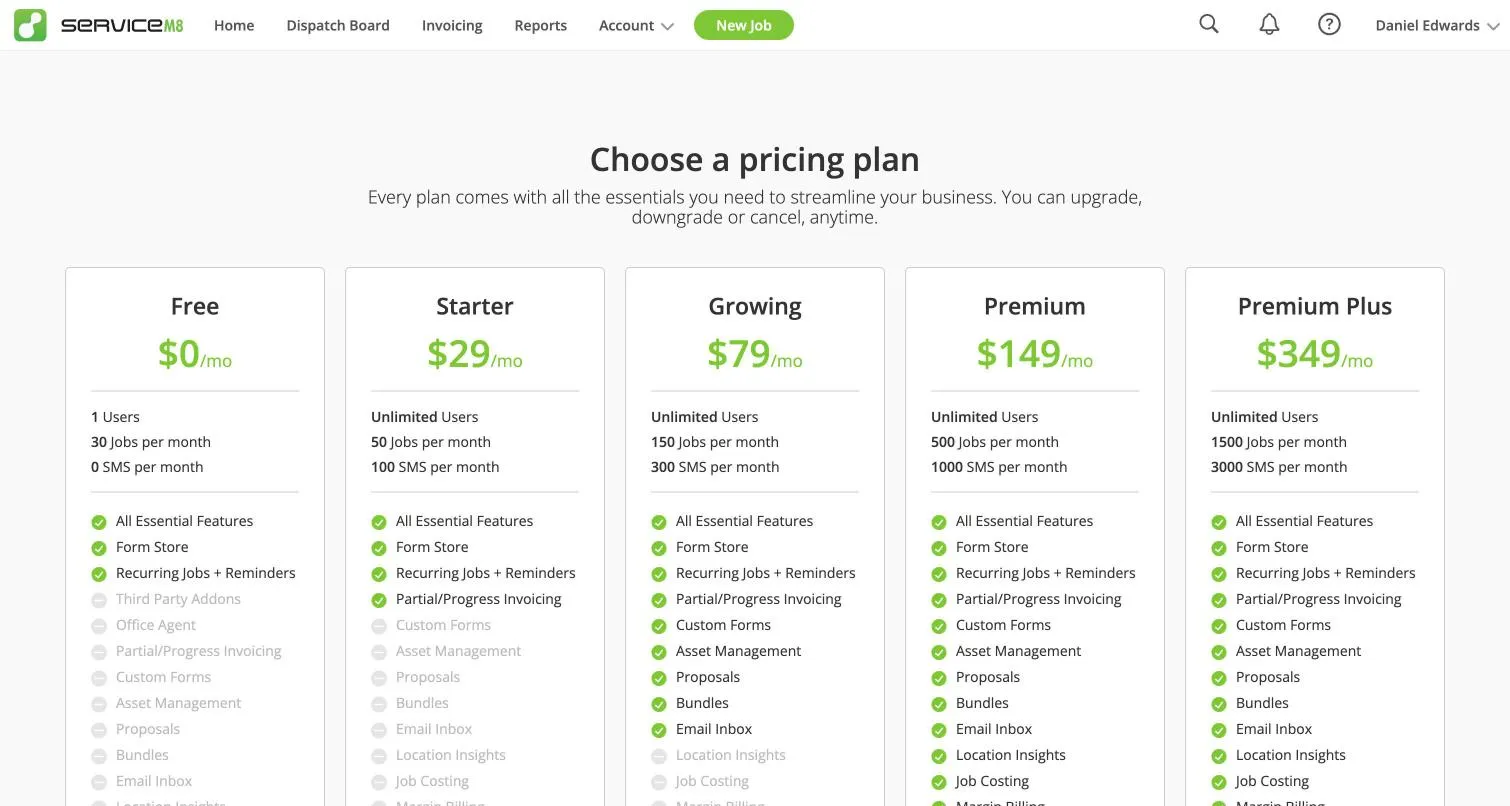
You pay per business, set by how many new jobs you create each month. Every paid plan has unlimited users. Prices in Australia include GST (ServiceM8 pricing, checked 26 October 2026).
| Plan | Per month (inc GST) | Ex GST | New jobs a month | Card fee (from 1 Oct 2026) |
|---|---|---|---|---|
| Free | A$0 | A$0 | 30 (1 user) | 1.89% + 30c |
| Starter | A$29 | A$26.36 | 50 | 1.69% + 30c |
| Growing | A$79 | A$71.82 | 150 | 1.49% + 30c |
| Premium | A$149 | A$135.45 | 500 | 1.39% + 30c |
| Premium Plus | A$349 | A$317.27 | 1,500, then 20c a job | 1.19% + 30c |
What each plan adds:
- Starter: progress invoices and deposits, supplier invoice import, the API and third-party add-ons.
- Growing: custom forms and certificates, asset management, proposals, bundles, the email Inbox and branded SMS. (Ready-made forms from the Form Store are on every plan.)
- Premium: job costing and profitability, markup billing, and location insights.
There’s a 14-day trial with no card, no lock-in and no setup fee. Businesses under two years old can get 50% off for their first 12 months (New Business Special).
Inside the app, the plan page lists the same five plans and prices but doesn’t say whether they include GST. The public pricing page does. It also shows each plan’s SMS allowance: none on Free, 100 a month on Starter, 300 on Growing, 1,000 on Premium and 3,000 on Premium Plus.
How jobs are counted. ServiceM8 charges “one job credit per job number”, and you can “schedule, invoice or quote a job as many times as you like” for that one credit (ServiceM8 help). Our test job kept the same number from quote to work order to invoice, so a quote that’s accepted doesn’t cost a second credit. The trial doesn’t show a job counter, so you can’t watch your usage until you’re on a paid plan.
ServiceM8 price history since 2019
ServiceM8’s four paid plans cost the same today as in August 2019: A$29, A$79, A$149 and A$349. A A$9 “Lite” plan existed from about 2020 to 2023 and was replaced by the Free plan. Over the same period Tradify’s entry price rose from A$39 to A$48 a user.
ServiceM8 job limits and job credits
Because the price follows your job count, a busy month can push you up a plan. At 151 jobs you jump from Growing (A$79) to Premium (A$149), an 89% rise for one more job. Each new job card uses a credit, but a quote that turns into a work order doesn’t use a second one. If you go over, you can keep working for seven days before you’re asked to upgrade.
ServiceM8 card fees and real monthly cost
Card fees often cost more than the subscription. Since 1 October 2026 Australian businesses can’t add a surcharge to eftpos, Mastercard or Visa payments, so the fee comes out of your price. If half your invoices are paid by card through ServiceM8:
| Business | Plan | Subscription | Card fees | Total (inc GST) |
|---|---|---|---|---|
| Sole trader, 40 jobs, A$600 invoices | Starter | A$29 | about A$183 | about A$212 |
| 3 people, 120 jobs, A$700 invoices | Growing | A$79 | about A$537 | about A$616 |
| 6 people, 300 jobs, A$800 invoices | Premium | A$149 | about A$1,428 | about A$1,577 |
ServiceM8’s card rate drops as you move up plans, so bigger teams save more. For the six-person business, card fees come to about A$510 a month less than the same payments through Tradify. There’s also a A$25 fee on each card dispute (chargeback).
The Free plan catch. On Free, each card payment you take earns a bonus job credit, so a sole trader doing 45 jobs could stay on Free by taking 15 card payments. But Free has the highest card rate. On A$600 invoices, those 15 payments cost about A$175 in fees on Free, against about A$186 on Starter (A$29 plus about A$157 in fees). Going “free” doesn’t avoid card fees.
ServiceM8 add-on prices
- ServiceM8 Phone: A$29 a month (Connect: 500 minutes, recording, caller ID) or A$49 (Connect Plus: adds an AI phone agent). Extra numbers A$8 a month (ServiceM8 Phone). Some sites still quote the old A$19.
- Office Agent Pro: A$49 a month for more AI usage and scheduled tasks. The standard Office Agent is included on paid plans with a daily allowance.
- Advanced Reporting Pack: needed for some reports and for exporting client and job lists.
ServiceM8 pricing in New Zealand
The same plan numbers apply in NZ dollars (NZ$29 to NZ$349) with the same job limits. NZ card fees are higher: 2.49% to 3.10% plus 30c depending on plan, per ServiceM8’s fee schedule. ServiceM8’s NZ pricing page shows 1.19% on Premium Plus, which looks like a copy of the Australian rate. Office Agent Pro is NZ$59.
ServiceM8 15 new features, including Office Agent AI
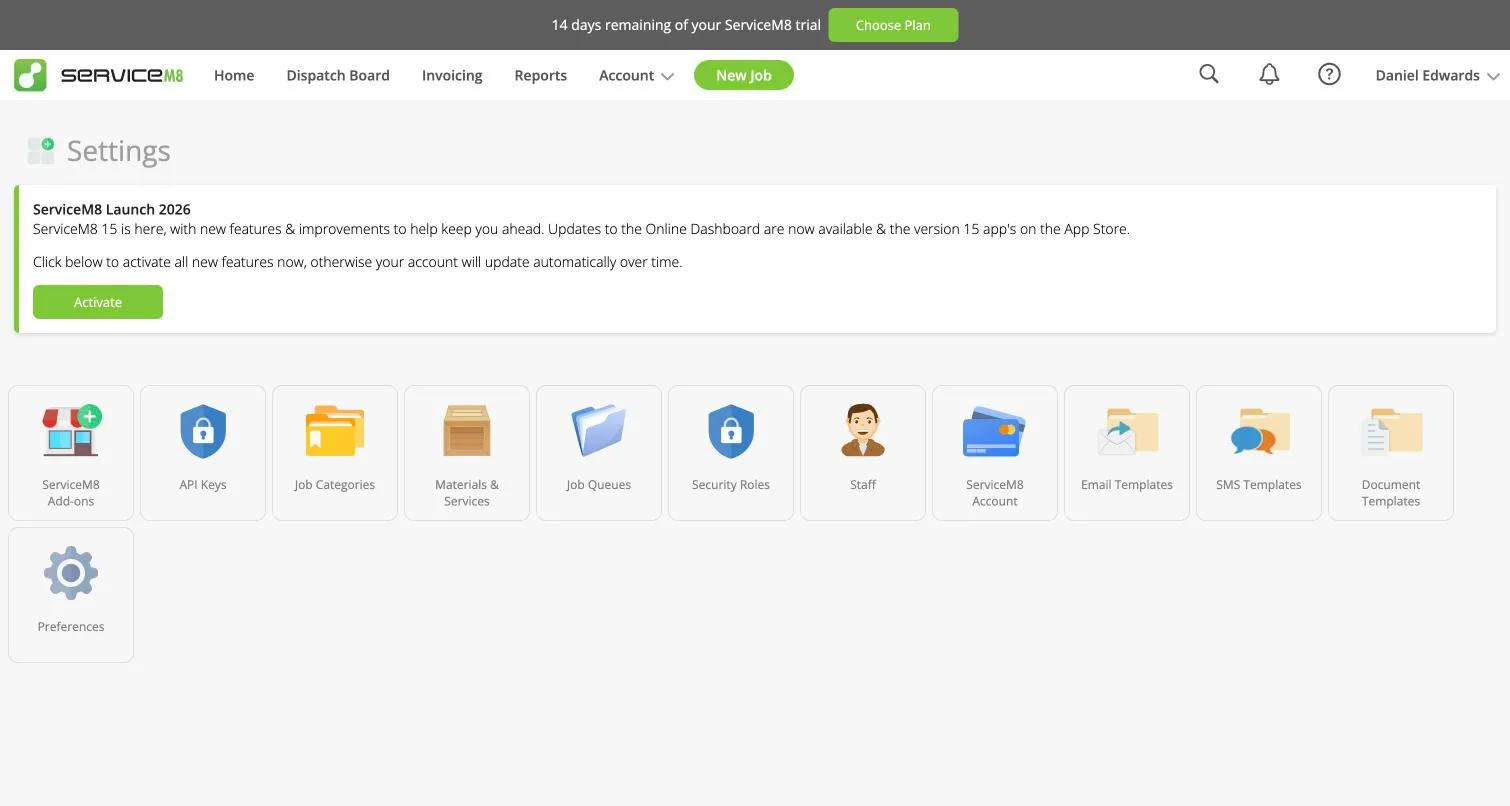
ServiceM8 releases a big update each September. ServiceM8 15 launched on 18 September 2026 and you switch it on yourself (and can switch parts of it off). Even our brand-new trial account started on the old version, with an “Activate” button in Settings. It took about 30 seconds.
The changes that matter most to a trade business:
- A full Android app, replacing the cut-down “ServiceM8 Lite”. More on this below.
- Office Agent, an AI assistant that drafts quotes, invoices, messages and bookings for you to approve, by chat online or by voice in the app.
- A new staff schedule with day, week and month views, multi-week jobs, undo and weather.
- Team Chat, with direct messages and channels inside ServiceM8.
- Materials and bundles in the app, barcode lookup with the job camera, supplier quote import, and pricing strategies for markups.
- An iPad app and an Apple Watch app.
- Lower card fees in Australia from 1 October 2026.
ServiceM8 Office Agent: four tests
Office Agent’s chat lives under the Help (?) menu, as “Ask the agent about your business”. The Office Agent tile on the home screen opens a different page, for scheduled tasks, which need the paid Office Agent Pro even on the trial. We asked it four things on the trial:
- “What jobs are booked for tomorrow, and who is doing them?” Correct in about 20 seconds: one job, the time, the customer, the address and who’s doing it. Without being asked, it pointed out that we’d sent the customer a “running late” text the night before.
- A new enquiry from rough notes, asking it to draft a quote. It can’t do this one. It said it can’t create a new customer or job, and asked us to create the job first and give it the job number. It did ask, sensibly, whether the unit price we gave included GST.
- “Which invoices are overdue, and how much is owed?” Correct: none, A$0. It didn’t invent anything.
- “Draft an SMS to Sam confirming tomorrow’s booking. Don’t send it yet.” It checked which time to use, then showed the text in a card with Approve and Decline buttons. Nothing went out until we pressed Approve.
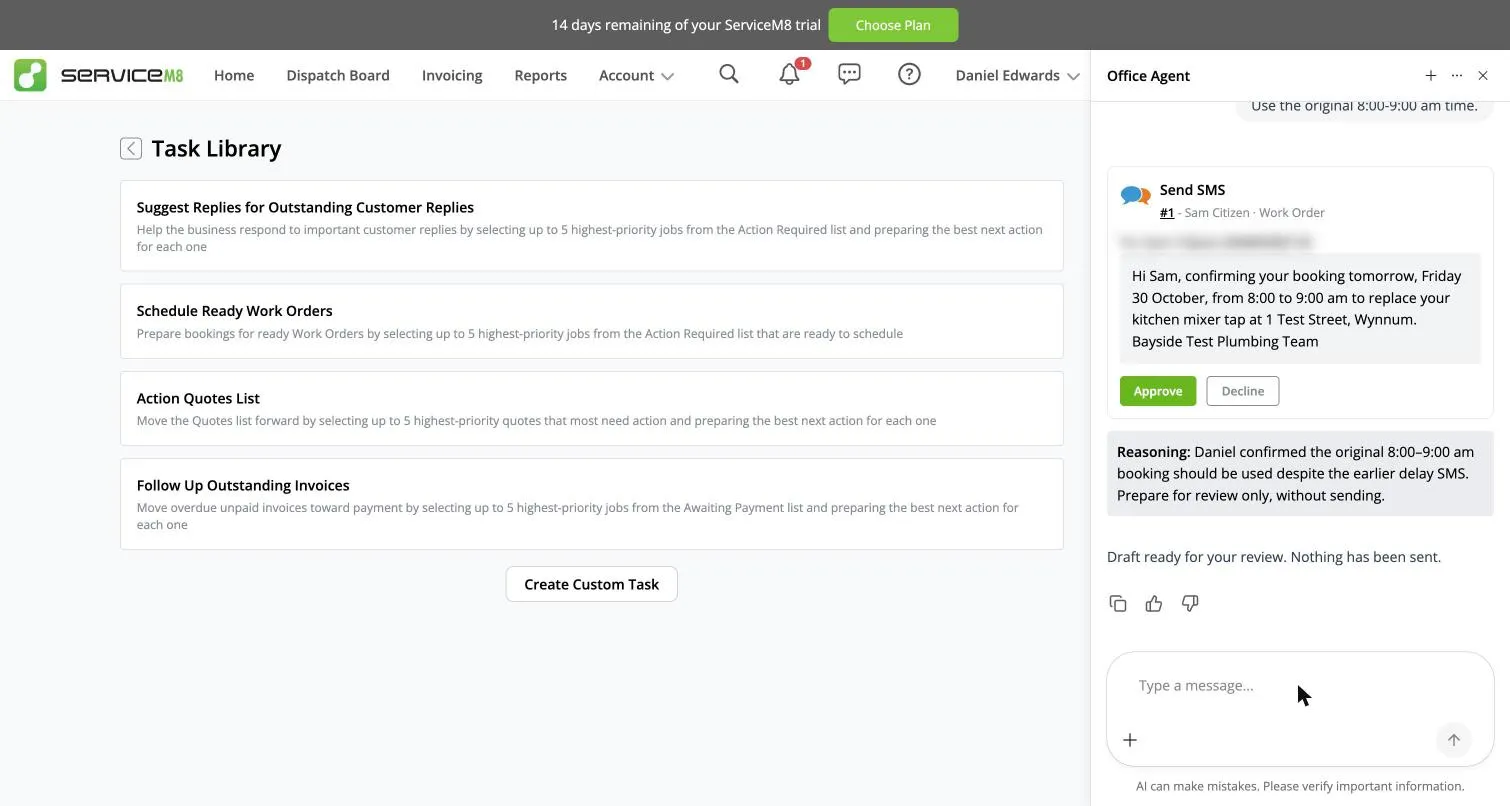
It’s a useful second pair of hands for looking things up and drafting messages. It doesn’t replace setting up jobs yourself. We didn’t see a daily usage meter anywhere on the trial.
ServiceM8 setup: four defaults to fix first
Signing up takes about a minute: four short questions about your trade, team size, accounting software and business details. The setup itself is straightforward. The catch is what’s hidden. The third question asks for your logo, but if you skip it, nothing reminds you later. The checklist on the home screen (“Learn the life of a Job”) walks you through quoting and invoicing, not finishing your setup. A short setup checklist would fix this. Until ServiceM8 adds one, check these four before you send your first quote:
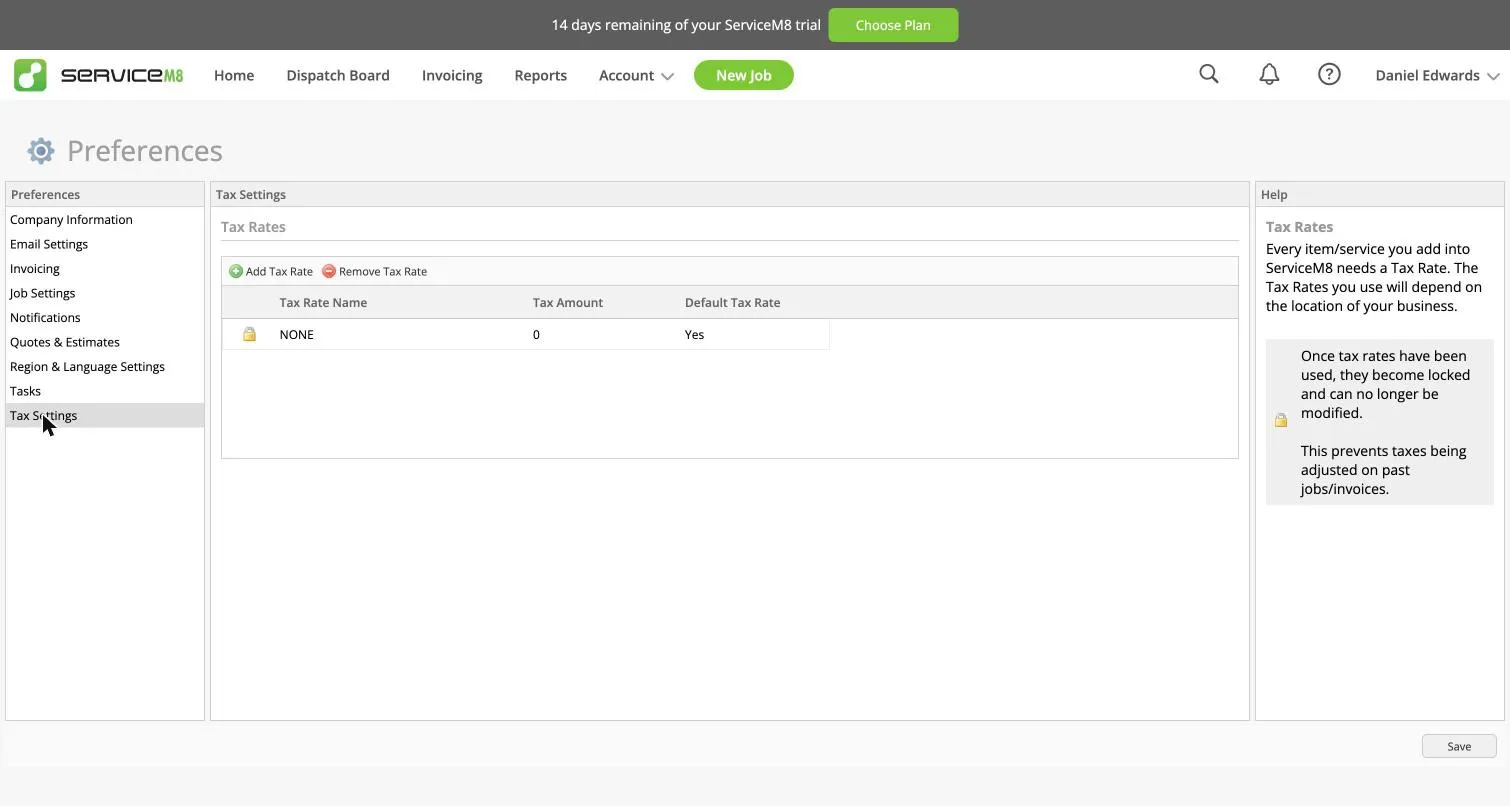
- Turn on GST. A new account has one tax rate, “NONE”, set as the default. Our first quote showed GST as A$0.00 even though the columns say “Price inc GST”. Add GST at 10% under Settings → Preferences → Tax Settings and make it the default. Connecting Xero also brings your tax rates across.
- Add your logo and ABN. Until you upload a logo, quotes and invoices print a grey “Your Company Logo Here” box, and “ABN:” prints blank.
- Rewrite the email and SMS templates. The default quote email calls your quote an “estimate” and says someone needs to inspect the site before you can give a firm price. The invoice email and text say “please call our office on” followed by a blank, until you add your phone number.
- Check your email address works. ServiceM8 blocks every email and text from your account until the owner’s email address is verified. Ours bounced the first time because we’d just moved the domain, and nothing could be sent until we verified it.
The ServiceM8 app on iPhone and Android
ServiceM8 was built for iPhone first and it shows: the iPhone app is the most complete. It works fully offline and syncs when you’re back in range, which matters if you work in basements, new estates or out of town.
A typical job runs like this: the enquiry comes in from the online booking form or a call, you create the job, send a quote by SMS or email, the customer accepts and signs online, you schedule it, the tech gets the job on their phone, takes photos, fills in forms, gets a signature, and invoices on site. The customer can pay by card on the spot, with Tap to Pay on the phone, or later from a link.
Quote to invoice: one job tested end to end
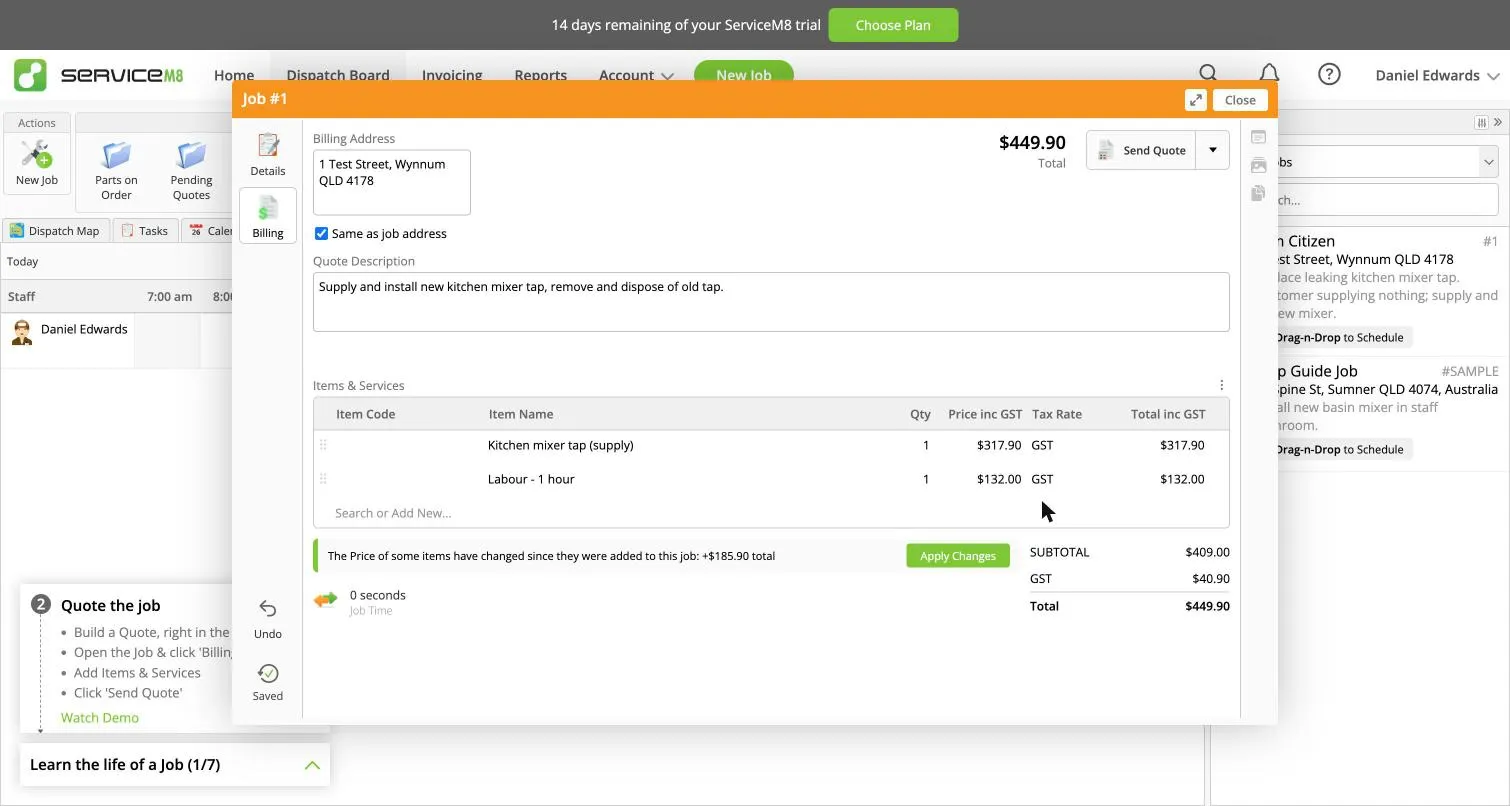
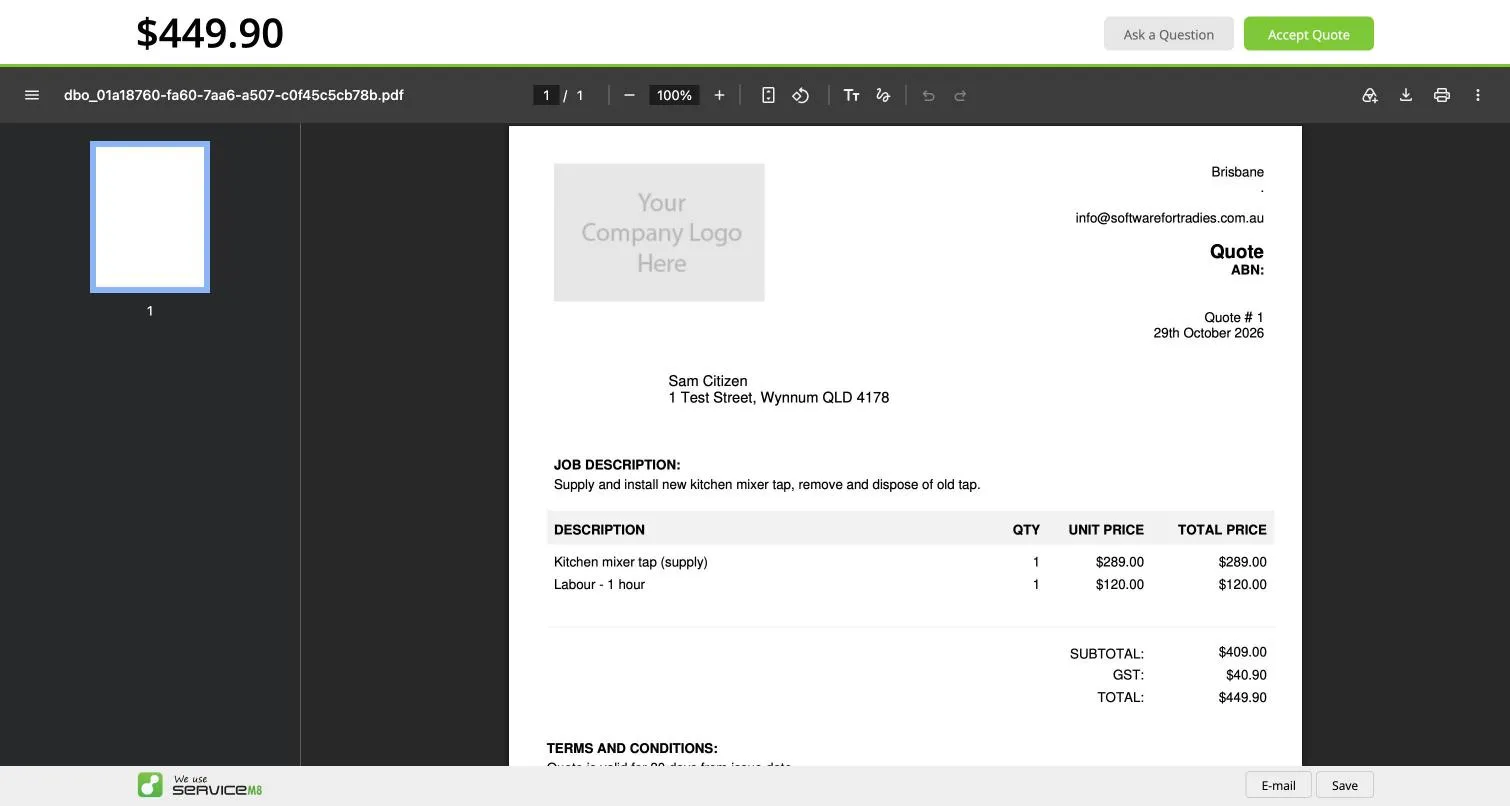
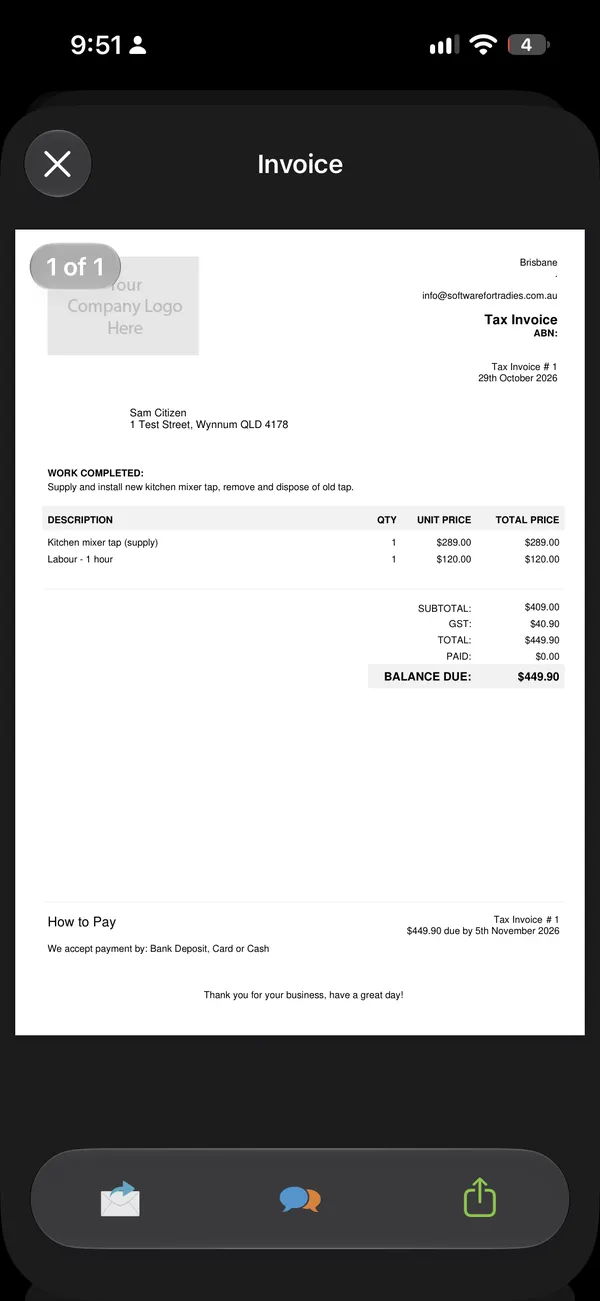
Here’s how our test job went: replace a leaking kitchen mixer tap, A$449.90 including GST.
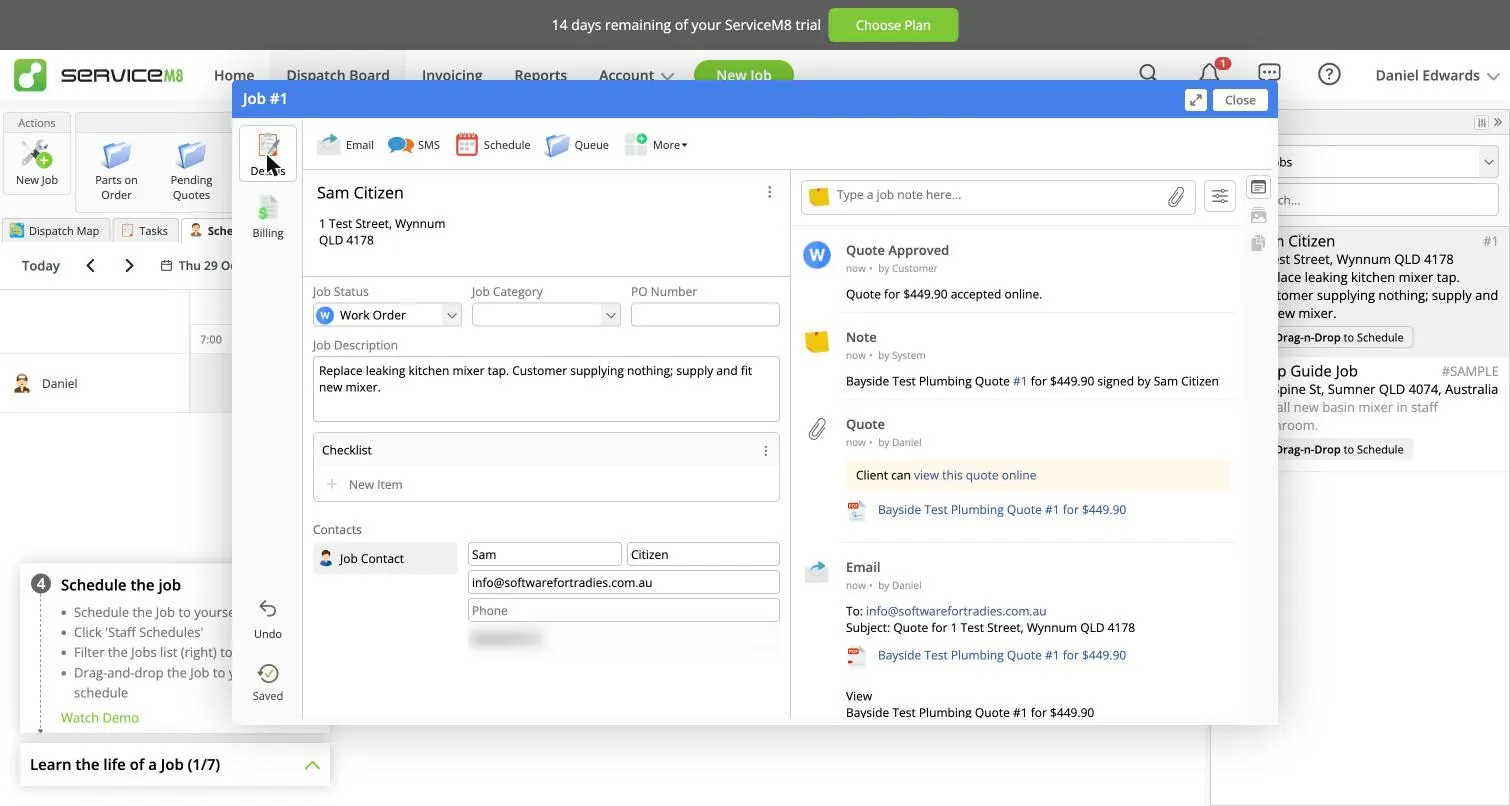
Quote. You create the job, type the customer’s name and address (it suggests addresses as you type), then add line items on the Billing tab. Everything saves as you go. Send Quote opens an email with the PDF attached and a short link to view and accept online.
Acceptance. The customer opens the link, sees the quote with Accept Quote and Ask a Question buttons, and types their name to sign. The job switches from Quote to Work Order straight away and the acceptance shows in the job’s history.
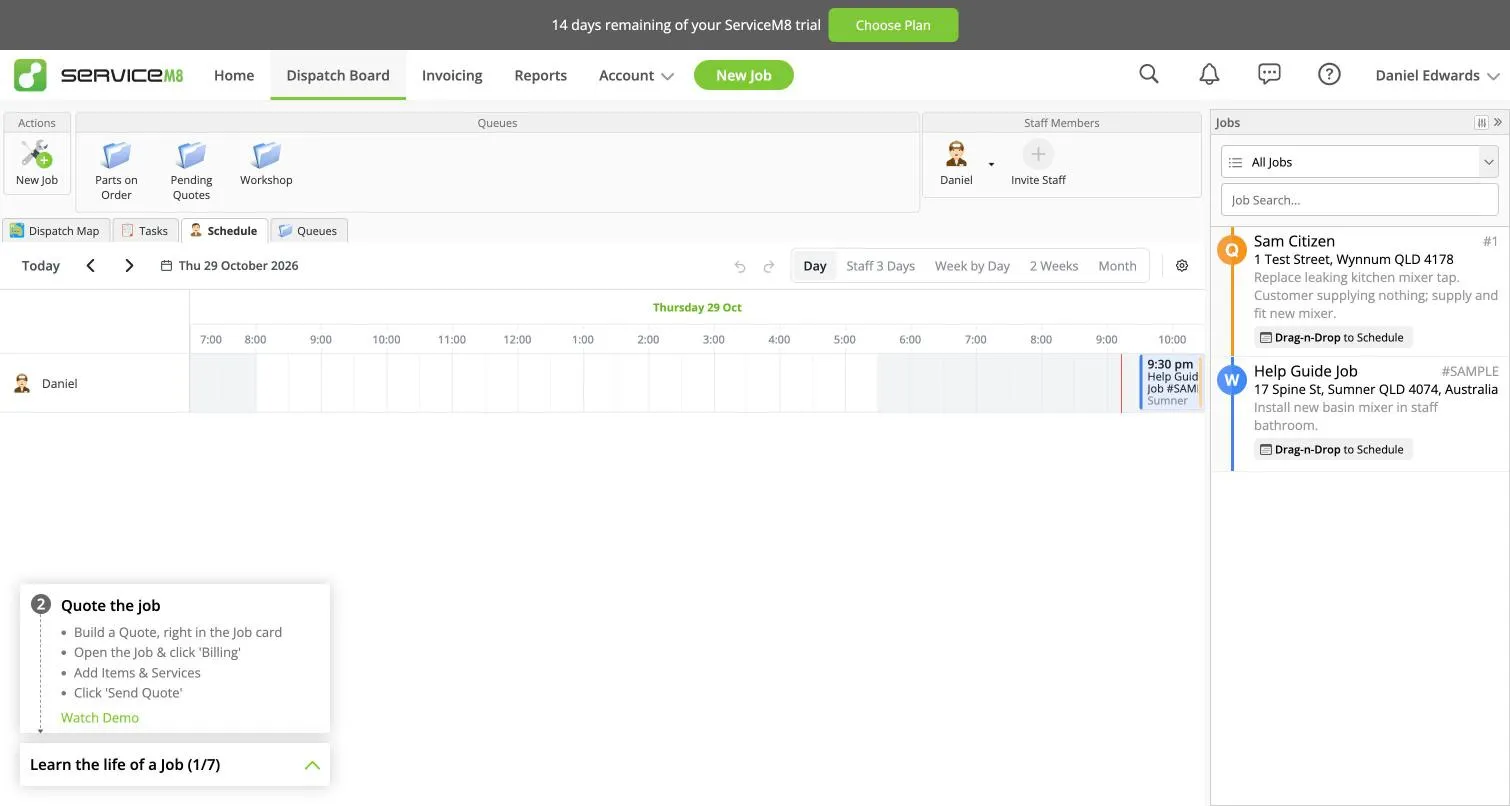
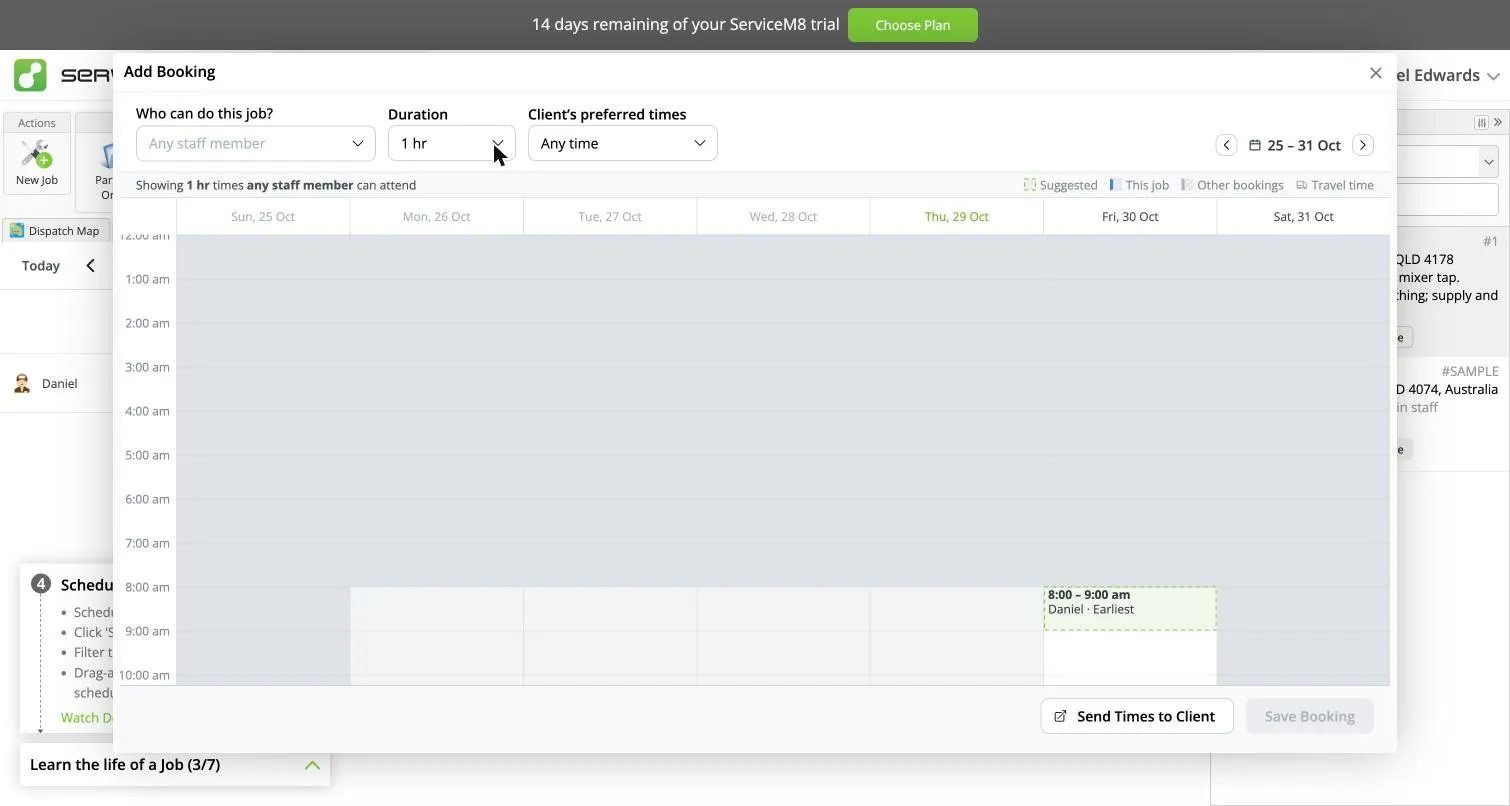
Booking. The booking window suggests the earliest free slot for the job’s length, skips times that are already taken, and can send the customer a choice of times instead. Booking doesn’t text the customer on its own.
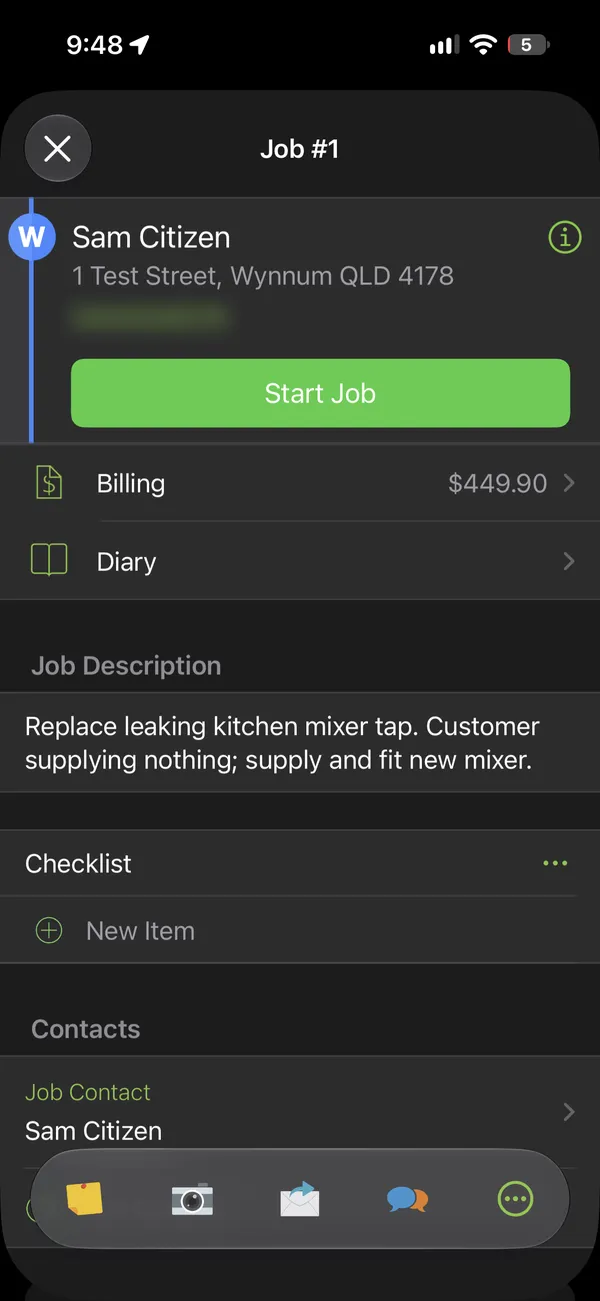
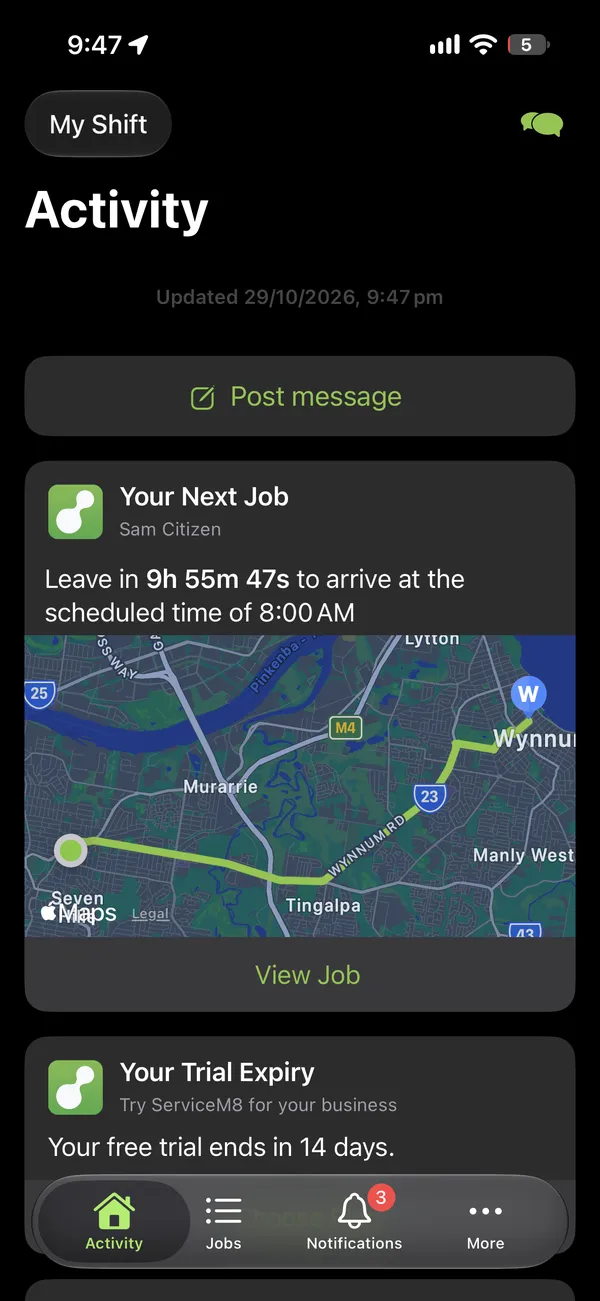
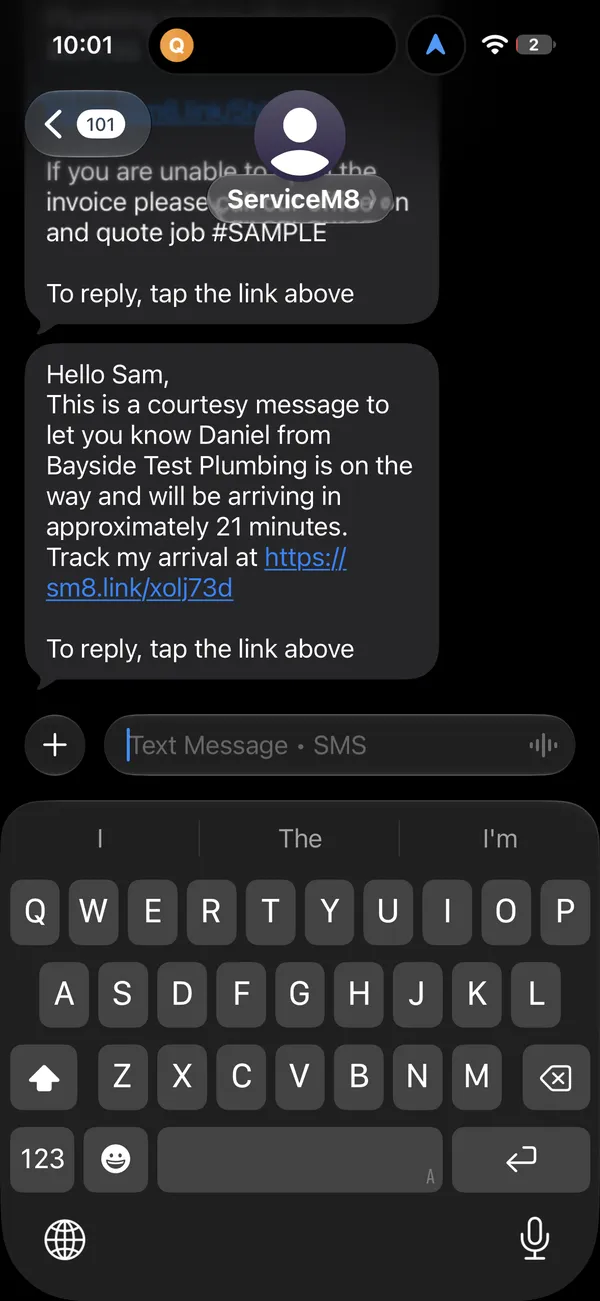
On the phone. The app’s home screen shows your next job with a route map and when to leave to get there on time. Start Job asks whether to text the customer that you’re on the way. One tap sends it, with an arrival estimate from your phone’s location and a link to watch you approach on a map (Track My Arrival, a free add-on that was already on). When you arrive, it clocks you on by GPS.
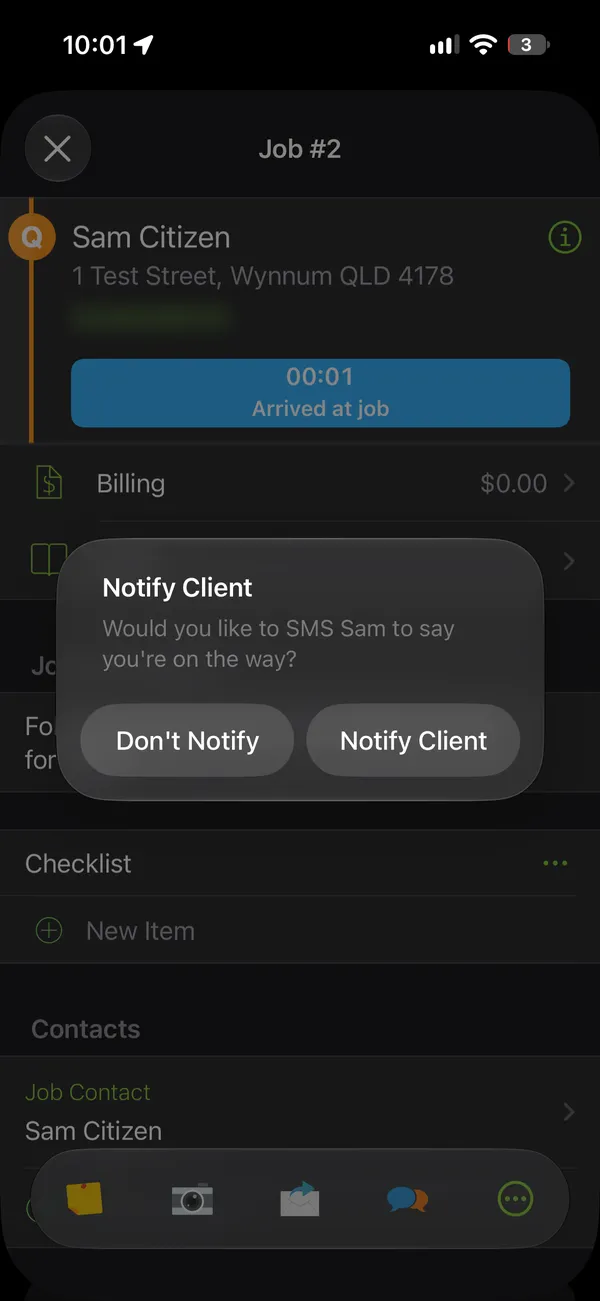
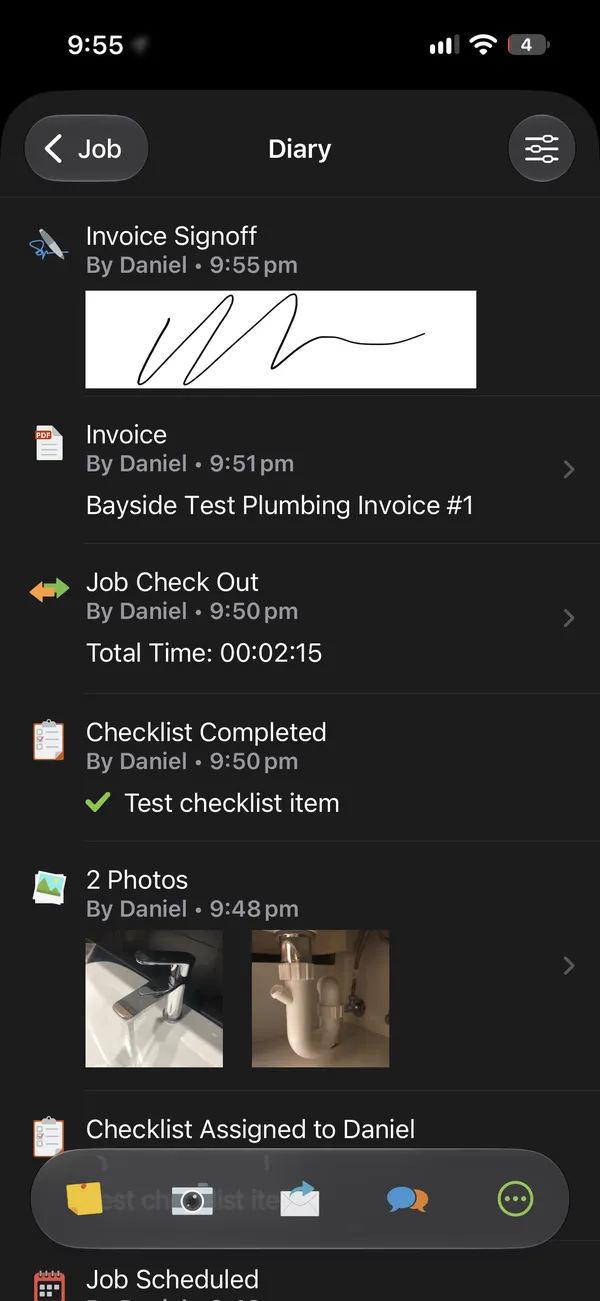
On site you add photos (the in-app camera tags them “Before Job” for you), tick off the checklist, and get a signature on a full-screen pad. Checking out records your travel and job time without a timer to remember. Job Complete takes you to Billing, then the invoice, which you can email, text or print from the phone.
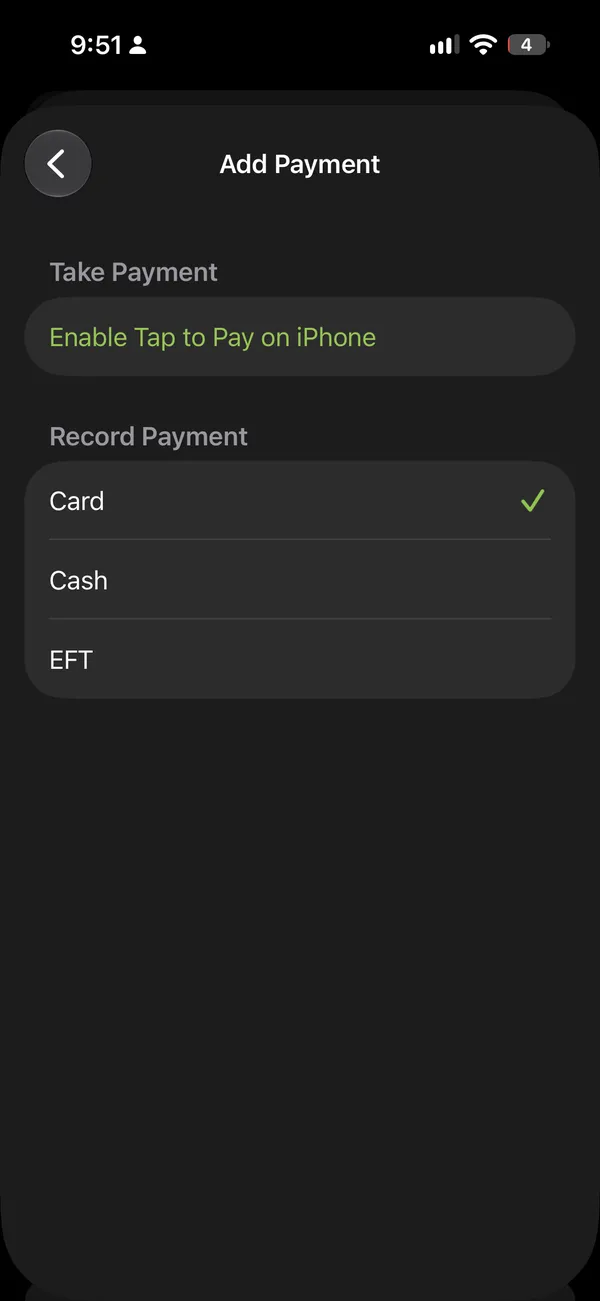
We didn’t take a card payment. Tap to Pay needs ServiceM8 Pay set up with your bank details first. Without it you can still record a card, cash or bank transfer payment, with a photo of the receipt.
What customers see: texts, quote links and replies
- Texts come from “ServiceM8”, not your business name. Sending under your own name (branded SMS) starts on the Growing plan.
- Replies go through a web page. Every text ends with “To reply, tap the link above”. The link opens a chat page with your business name, the job, any invoice, a call button and an unsubscribe link.
- The quote and invoice links open the PDF with clear buttons to accept, ask a question or view the invoice.
For the online enquiry form and booking page, see getting website enquiries into ServiceM8 below.
ServiceM8 Android app vs iPhone
Better, but check it on your crew’s phones. Until September 2026 Android users got “ServiceM8 Lite”, a limited app. ServiceM8 15 replaced it with a full app that ServiceM8 says has “almost all the same functionality as the iOS app” (ServiceM8 help). Four things are still iPhone-only: Room Scan and AR measuring, drawing diagrams, editing and filling PDFs, and automatic in-camera photo tagging.
The ratings show the gap Android users lived with:
| Where | ServiceM8 rating |
|---|---|
| Apple App Store (Australia) | 4.54 from 5,564 ratings |
| Google Play (worldwide) | 3.76 from 737 ratings |
| Xero App Store (Australia) | 4.56 from 351 reviews |
| Capterra | 4.5 from 311 reviews |
| Trustpilot (Australia) | 4.4 from 97 reviews |
Google Play reviews have improved since the new app. Reviews in 2026 before the release averaged 1.95 stars (57 reviews). Reviews in the five weeks after averaged 3.2 (20 reviews). That’s a small sample, and the new reviews are split: some say it “works a dream now”, others say uploading photos from the phone’s gallery was removed, which ServiceM8’s own launch notes describe as new.
Our Android test. We ran ServiceM8 for Android (version 15.0.3) on Android 17, using an Android Studio emulator rather than a physical phone, and created and started a job on it. The layout and most features match the iPhone app. The differences we found:
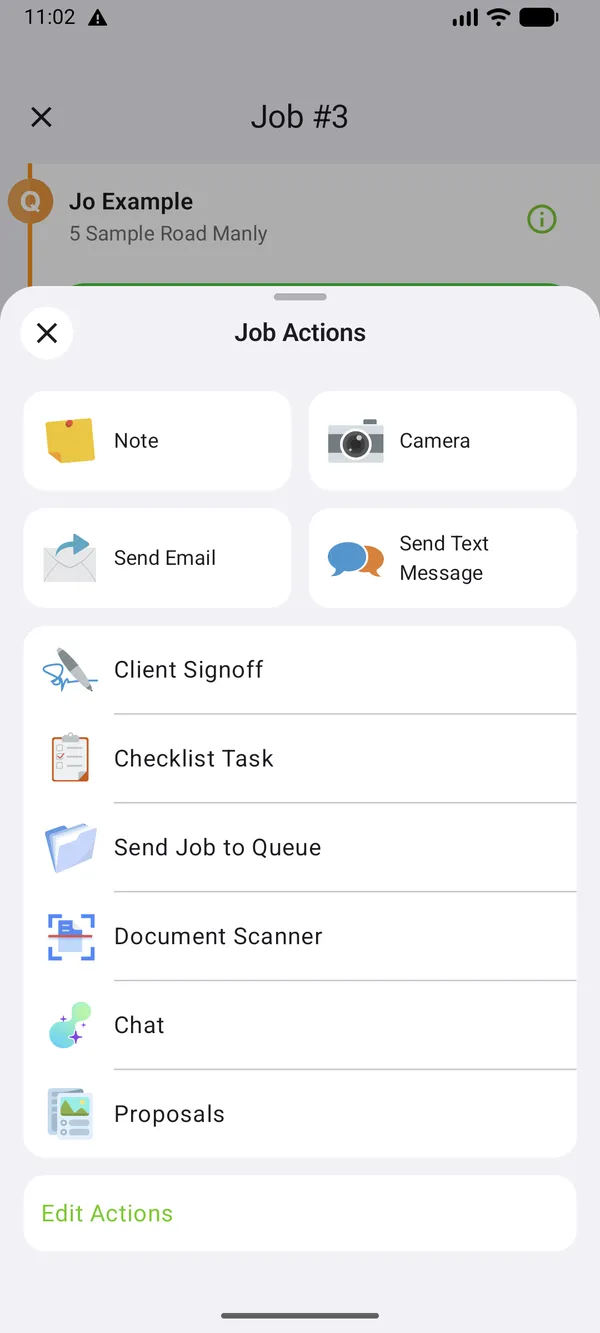
- No AR Measure or Room Scan. Everything else in the Job Actions menu is there, including Client Signoff, the Document Scanner and the AI Chat.
- A simpler camera. No gallery button, no photo tags and no automatic “Before Job” label, all of which the iPhone camera has.
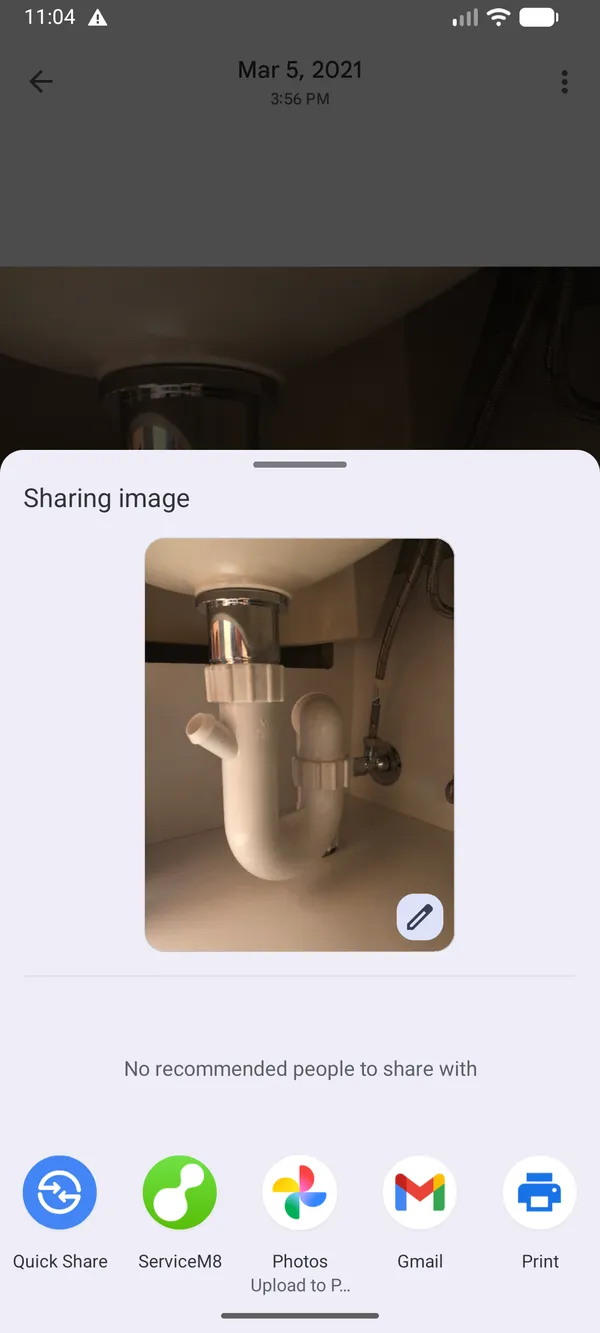
- Gallery photos didn’t attach. There’s no attach option on a job, note or diary. ServiceM8 appears in Android’s share menu, but sharing a photo to it from Google Photos closed straight away with nothing attached. That may be down to the emulator, so check it on a real phone before you rely on it, especially if your crew sends photos from the gallery.
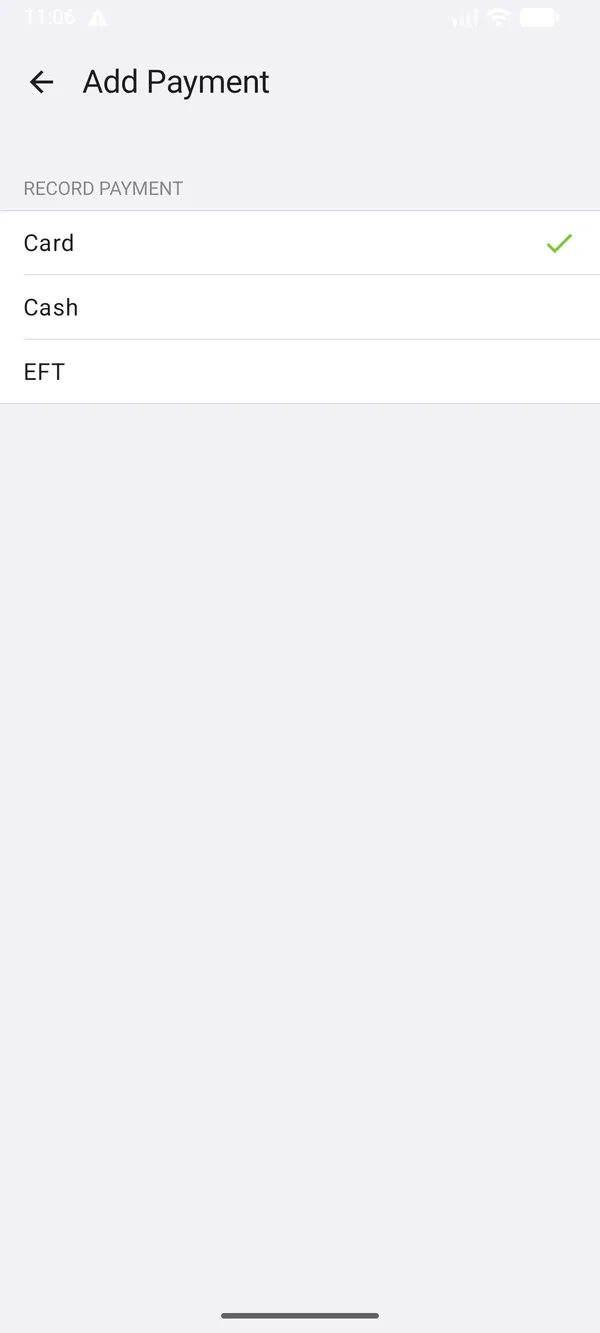
- No Tap to Pay option. The iPhone app offers “Enable Tap to Pay on iPhone”. On our Android test you could only record a card, cash or bank transfer payment. Our emulator has no NFC chip, which Tap to Pay needs, so this one isn’t conclusive either.
- One Android-only extra: starting a job offers a “Take Job Photo” shortcut in the phone’s Quick Settings panel.
If most of your crew are on Android, trial it on their actual phones before you commit.
ServiceM8 GPS staff tracking
ServiceM8 tracks staff location through the app, on all plans, and on iPhone it can record travel time for you. Tell your staff, and check your obligations under state workplace surveillance laws before you rely on it.
Getting website enquiries into ServiceM8
ServiceM8 gives you three ways to get enquiries from your website into the app. We tested all three. The right one depends on whether you run Google Ads or Facebook ads and need to count the leads they bring in.
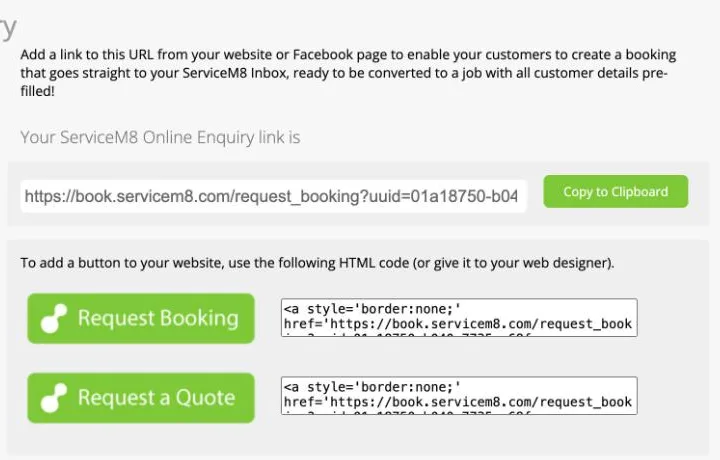
1. The enquiry form (free add-on: Simple Online Enquiry). Switching it on gives you a link to a form on ServiceM8’s own site, plus code for a “Request a Quote” button. You can’t embed it in your own page or style it. The form asks for:
- business name;
- contact name;
- email;
- phone;
- address, with suggestions as you type;
- a description and an attachment.
It has a “not a robot” check. Enquiries arrive in ServiceM8’s Email Inbox, where one click turns them into a job. The Inbox is a Growing plan feature.
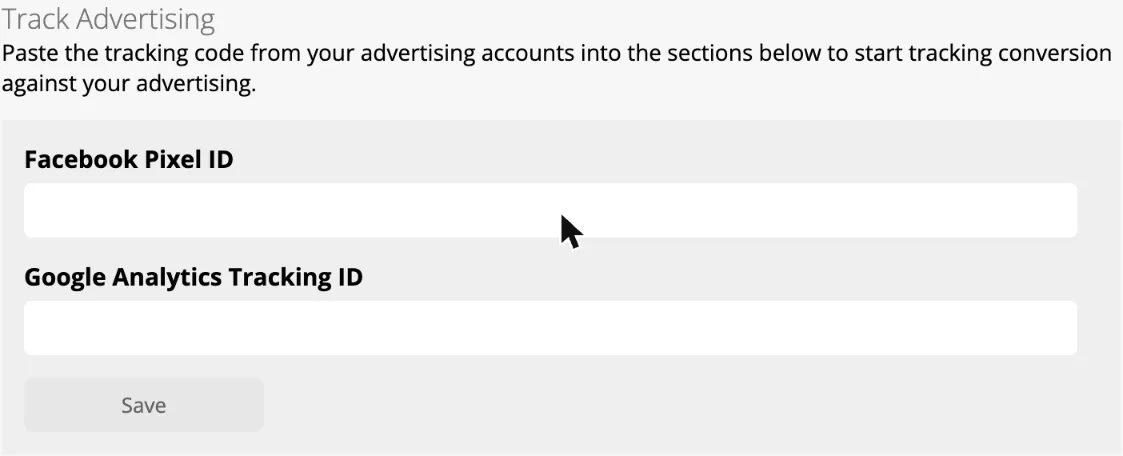
2. The booking page (free add-on: Self Serve Online Booking). Customers pick a service you’ve set up, see a price and choose a time. Its settings have a Track Advertising section with a Facebook Pixel ID and a Google Analytics ID. We entered a test Google Analytics 4 ID and read the booking page’s code. It sends GA4 a generate_lead event when someone sends an enquiry, and a purchase event with the price when they book a priced service. It sends the matching Facebook pixel events too.
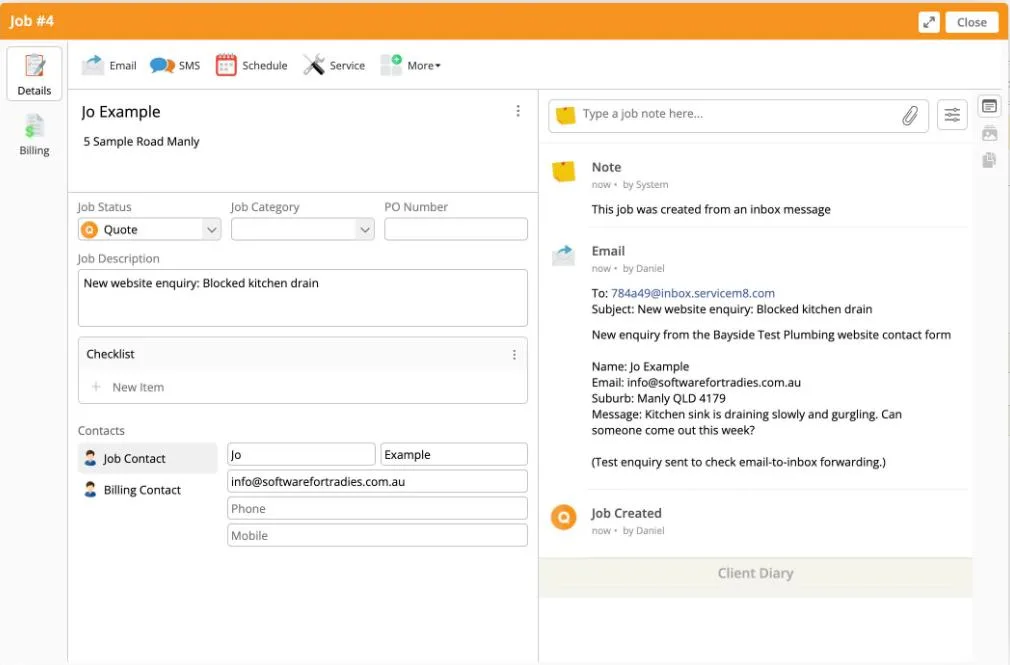
3. Email. Every account has its own inbox address. We emailed it a message laid out like a website form notification, with the name, email, suburb and message on separate lines. It was in the Inbox within a minute. “Convert to Job” created the job straight away and picked the customer’s name out of the email text.
ServiceM8 and Google Ads conversion tracking
If you run Google Ads, here’s what each option can do:
- The enquiry form can’t be tracked. There’s nowhere to add your own Google Analytics or Google Ads tag. ServiceM8 does record a lead’s source in its own reports if you add
utm_sourceto the link. - The booking page reports leads and bookings to GA4. You can import those into Google Ads as conversions. But the page lives on ServiceM8’s site, so unless your ad sends people straight to it, you’ll need to set up cross-domain measurement in GA4 for clicks from your site to count.
- Neither form supports enhanced conversions. Google Ads enhanced conversions need the customer’s email or phone sent with the conversion. ServiceM8’s booking page doesn’t send them, and there’s no Google Ads or Tag Manager field to set it up.
If you track leads properly, the best setup is your own form on your own website. Your Google tags and enhanced conversions run there as normal. The form then sends the enquiry into ServiceM8, either by emailing your inbox address (no developer needed) or through the API.
ServiceM8 API, webhooks and Zapier
ServiceM8 has a documented public REST API (developer.servicem8.com), on Starter and up.
- What it can create: jobs, clients, contacts and inbox messages, and it can turn an inbox message into a job. A web developer can post your website form straight in.
- Webhooks: they notify your system when a job is created or completed, or when a record changes.
- Zapier: for no-code connections.
ServiceM8 Xero integration, API and add-ons
ServiceM8’s Xero sync is one of the best of the small-team apps. Invoices go to Xero when you approve them, payments received in Xero come back within 30 minutes and mark the invoice paid, and customers and items sync both ways. Add-ons cover tracking categories and sending staff shift times to Xero Payroll. It also connects to MYOB and QuickBooks. See job management software that works with Xero for the detail.
ServiceM8 has a public API (Starter and up), Zapier, an add-on marketplace, and, since ServiceM8 15, connections that let ChatGPT or Claude look up jobs and send messages.
ServiceM8 Xero sync test
We connected ServiceM8 to a Xero demo company. It’s one screen in Xero: pick the organisation and allow access. ServiceM8 then pulls in your contacts and items on its own.
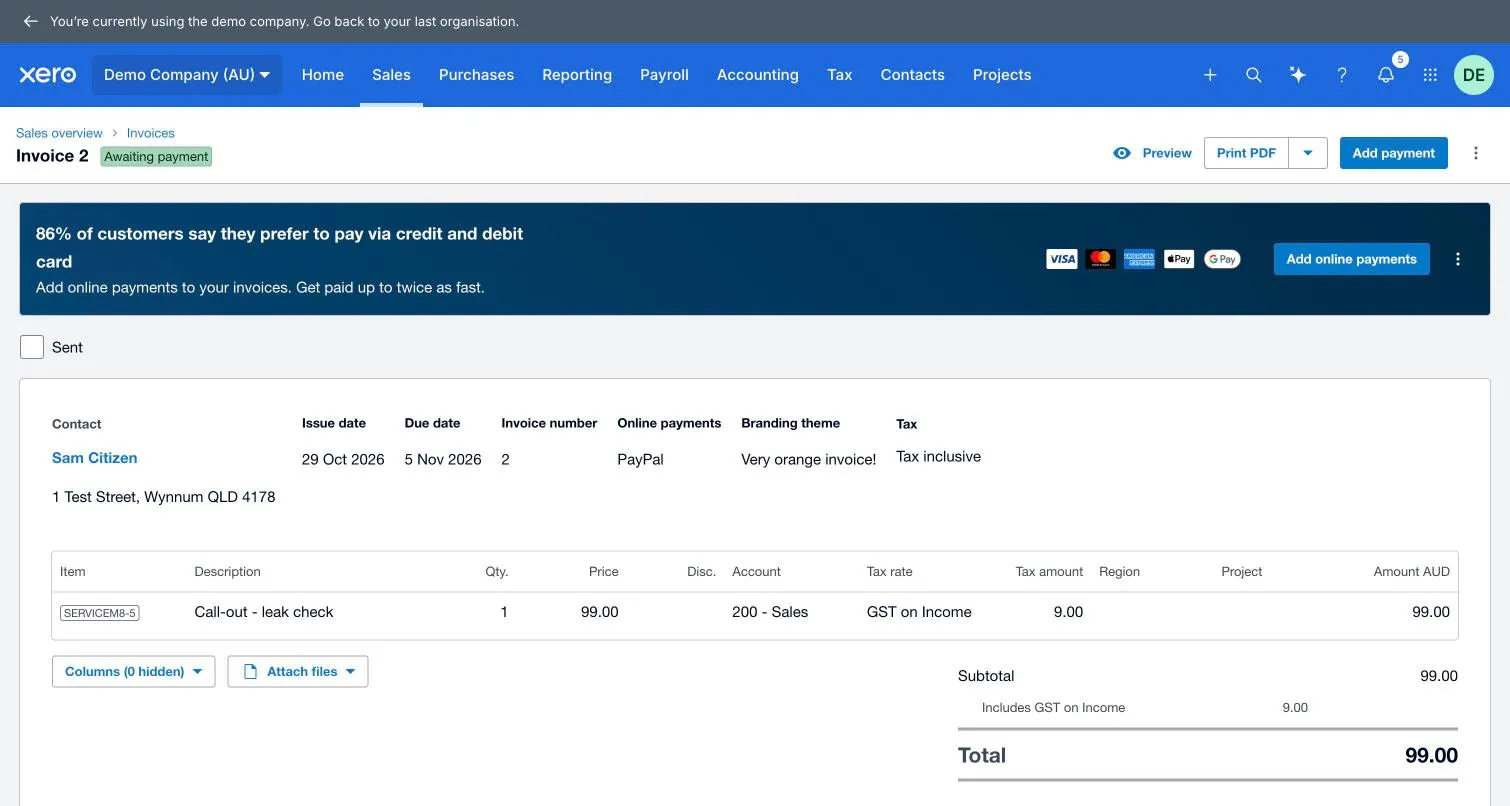
- Invoice to Xero: under a minute. We approved a A$99 call-out invoice in ServiceM8 and it was in Xero as “Awaiting payment” less than a minute later. The customer was created as a Xero contact with their address, the line went to the Sales account with GST on Income (A$9), and the invoice number matched. Xero adds a “Go to ServiceM8” link on the invoice.
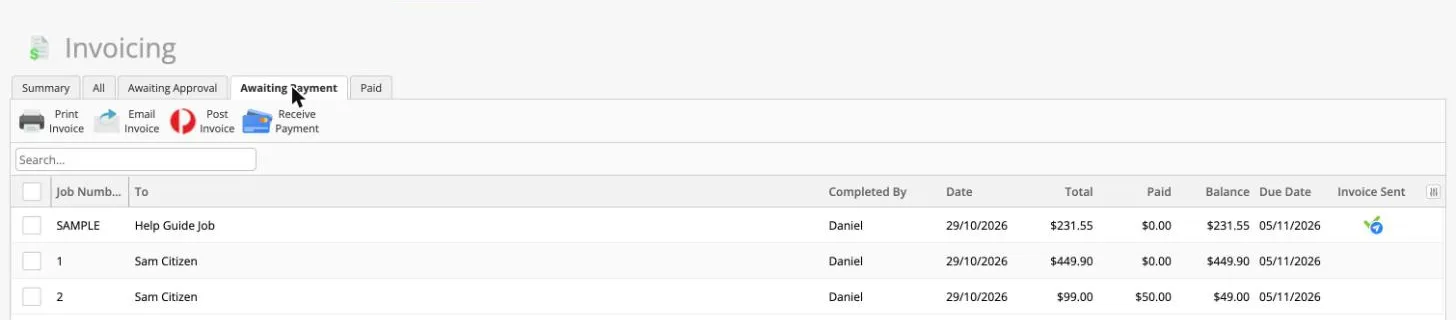
- Payment back to ServiceM8: under five minutes. We recorded a A$50 part payment in Xero. ServiceM8 showed A$50 paid and A$49 owing within five minutes, well inside the 30 minutes ServiceM8 quotes.
- Only new invoices go across. Invoices we’d approved before connecting Xero stayed in ServiceM8 and never reached Xero. If you’re switching mid-month, connect Xero first, or enter the earlier invoices by hand.
We didn’t test the Xero Payroll timesheet add-on or tracking categories.
ServiceM8 downsides, support and backups
- No purchase orders or stock control. ServiceM8 “does not have built-in functionality to create and send purchase orders”, and stock levels come from your accounting software (ServiceM8).
- Not built for long projects. It has progress invoicing but no Gantt charts or retentions. One electrician on Reddit described it as “truly designed for one site visit is one job is one invoice”.
- No phone support. Support is 24/7 chat and email. No phone line comes up again and again in Capterra and Trustpilot reviews.
- Job-limit price jumps. See the pricing section above.
- Basic reporting unless you add the Advanced Reporting Pack or move to Premium.
- Leaving is one-way. ServiceM8’s backup is “for reference only” and can’t be imported into another account, and cancelling deletes your data. Export what you need first.
ServiceM8 live chat support test
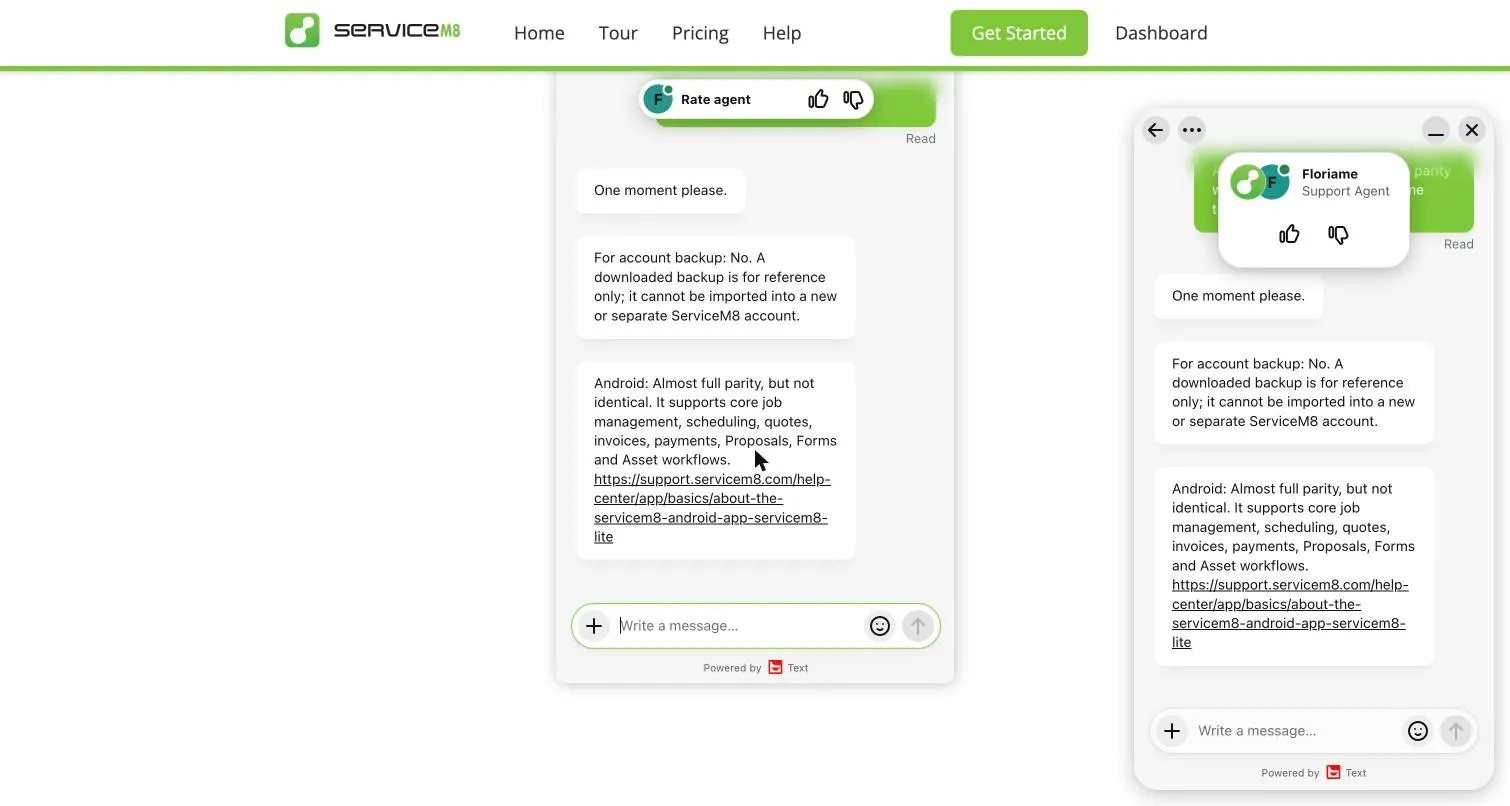
We asked live chat two questions at 9:28 pm on a Thursday (Brisbane time): can a downloaded backup be imported into a new account, and is the Android app at parity with the iPhone app. A person replied “One moment please” within about a minute and a half, and both answers arrived within about seven minutes:
- Backup: “No. A downloaded backup is for reference only; it cannot be imported into a new or separate ServiceM8 account.”
- Android: “Almost full parity, but not identical”, with a list of what it supports and a link to the help article. It didn’t say what’s still iPhone-only. You have to click through for that.
Quick, accurate and a little brief. That’s one evening’s test, so treat it as a sample, not an average.
Making a backup is under Settings → ServiceM8 Account → Download account backup. ServiceM8 builds it first (“a few minutes to several hours”, one a day), then emails you to say it’s ready. Ours, a small test account, was done in under a minute. You download it from the same page, not from the email, and it’s kept for 48 hours.
The file is a zip: 8.5 MB for our account, almost all of it job photos at full size, plus a PDF and a set of XML files, one per record. It’s a snapshot from when you asked, so anything after that isn’t in it. XML isn’t something you can open in Excel and use, which fits what support told us: the backup is for your records, not for moving to another app. If you’re leaving, export your client and job lists as well (that needs the Advanced Reporting Pack).
ServiceM8 vs Tradify
ServiceM8 charges per business and Tradify per user, so ServiceM8 gets cheaper the more people you have: at three people, A$71.82 ex GST on Growing against A$156 for Tradify Pro. ServiceM8 works offline and has an API; Tradify does neither. Tradify rates higher on every app store and is often called the easier of the two to learn. Our ServiceM8 alternatives guide covers when Tradify is the better pick.
Who is ServiceM8 best for?
- Strong fit: two to 15 people doing lots of short jobs (call-outs, servicing, cleaning, pest control), and more so if you take card payments or work out of range.
- Good fit: a sole trader on up to 30 jobs a month (Free) or 50 (Starter).
- Look elsewhere: one or two people doing hundreds of small jobs a month, project builders who need Gantt charts and retentions, and businesses that need purchase orders and stock in the van. See ServiceM8 alternatives.
ServiceM8 FAQs
Is ServiceM8 free? There’s a free plan for one person doing up to 30 new jobs a month. Paid plans start at A$29 a month including GST.
Who owns ServiceM8? It’s a private Australian company, founded in 2009 by Kim Ford and Ben Ford.
What is ServiceM8 Pay? ServiceM8’s built-in card payments, processed by Stripe, with next-business-day payouts. Rates run from 1.89% down to 1.19% plus 30c depending on your plan.
Does it work with Xero? Yes, with two-way sync for customers, items and payments.
Does ServiceM8 send “on my way” texts? Yes. When you start a job in the app it offers to text the customer that you’re on the way, with an arrival estimate and a link to track you on a map.
Written by Dan Edwards
Dan sets up job management, call tracking and CRM systems for trade businesses. More about Dan.