 AroFlo
 ServiceM8
 Simpro
 Tradify
Review
Fergus software review (2026): for plumbers, sparkies and crews of 1–20
Fergus tested hands-on: per-user cost plus GST, supplier invoices and job profit, certificates, offline mode on iPhone and Android, the Xero sync, and who it suits.
By Dan Edwards · Updated
Some links on this page earn a commission if you sign up. It never changes the order or the verdict. How we keep the lights on.
On this page
- What is Fergus?
- Fergus pricing in Australia (2026)
- Fergus setup: what signing up asks
- Fergus hands-on test: one job from quote to invoice
- The Fergus Go app on iPhone and Android
- Fergus Xero integration and accounting
- Fergus cons: where it falls short
- Fergus support and your data
- Fergus in New Zealand
- Who is Fergus best for?
- Fergus FAQs
We used Fergus’s 14-day trial from 30 October 2026, with the Pro features switched on: the web app on a Mac, Fergus Go on an iPhone, and the Android app on an Android emulator. We set up the same made-up Brisbane plumbing business we used for our ServiceM8 review and our Tradify review, quoted the same job, invoiced it, put a supplier invoice on it and filled in a Queensland plumbing certificate. We also ran jobs on both phones with no signal and connected Fergus to Xero.

Short answer
Fergus
Fergus is the job app for plumbers and electricians who want to know what each job made. Supplier invoices land on the job, and it shows profit per job as you go. Best for crews of three to ten who buy a lot of materials, if the per-user price works for you.
A$77 per user a month + GST
Professional (called Pro in the app), which you need for forms, SWMS, purchase orders and automatic supplier imports. Essentials is A$53. Timesheet-only users are from A$26 and contractors A$4 a day. GST is added on top.
Why pick it
- Supplier invoices are read for you: our test PDF landed on the job, line by line, in about 15 seconds with nothing typed.
- Profit per job as you go: costs, sell price and margin on every job, and business profit from your Xero figures.
- The best start of the three apps we tested: a checklist that asks for your ABN, bank details and logo, GST and time zone right, a A$110 labour rate already in, and example jobs to learn on.
- Notes, photos and the timer keep working when you lose signal, and the timer survived the app being closed.
- Certificates built in: Queensland plumbing and electrical forms that fill in the official form, and NSW CCEW lodgement.
- Invoices reached Xero in 15 seconds, with labour and materials on separate lines.
Trade-offs
- Per-user price, plus GST. A crew of three on Professional pays A$231 a month ex GST, against A$71.82 for the whole business on ServiceM8 Growing. Fergus prices are up about 20% since mid-2025.
- No "on my way" text. The message button opens your phone's own texting app with a blank message. ServiceM8 sends a text with a live arrival estimate, and Tradify has ready-made texts.
- Payments from Xero were slow to show. A payment we recorded in Xero still hadn't reached Fergus 13 minutes later, until we pressed Refresh Data. ServiceM8 did it on its own in under five minutes.
- Offline only once a job is open. Reopen the app with no signal and the job lists and search don't load. ServiceM8 works fully offline.
SFT score breakdown6 parts
- Price and value6
25% of the score. A$53 per user plus GST on Essentials, and A$77 on Professional, which you need for forms, SWMS, purchase orders and automatic supplier imports. A crew of three on Professional pays about three times ServiceM8. Prices are up 20% since mid-2025.
- Quote to invoice8
25% of the score. A quote in about three minutes and the invoice in one, with a sensible labour rate, markup columns and progress claims. A supplier PDF landed on the job with nothing typed. The invoice hides the line items by default, and approving one on the phone showed an error.
- Setup8
10% of the score. The Getting Started checklist asks for your ABN and logo, and GST, time zone and labour rate are right from the start. Example jobs help you learn. One warning says you can't quote without bank details, which isn't true.
- Phone apps7
15% of the score. Gallery photos, the timer and signatures work on iPhone and Android, and notes, photos and time save offline. No "on my way" text, and reopened with no signal the app couldn't show any jobs.
- Xero6.5
15% of the score. Invoices reached Xero in 15 seconds with labour and materials split. But Fergus wouldn't connect to Xero's demo company, and a payment made in Xero didn't show in Fergus until we pressed Refresh Data 13 minutes later.
- Support and your data6.5
10% of the score. Support not yet tested: we haven't put a question to Fergus's support, so this part is scored on what's offered and on getting your data out. Email and chat on Essentials, phone only on Professional. Customers export to a CSV, but jobs and invoices don't, and a full export is by request.
Free trial: 14 days, no card, no setup fee. We tested it hands-on from 30 Oct 2026.
Our take. Fergus is built around materials and margins, and that part works well. A supplier invoice PDF was read and put on our job in seconds, and the job’s profit updated straight away. Quoting and invoicing are quick, and the setup is the most thorough of the three apps we’ve tested: GST, labour rate and time zone were right from the start. Where it falls short is the field and the money coming back. The app has no “on my way” text, and offline it only helps if you opened the job before you lost signal. The Xero link sent invoices across in seconds, but a payment made in Xero took a manual refresh to show up. And it costs more than ServiceM8 or Tradify for a crew. We’d point a plumbing or electrical crew of three to ten who buy a lot through Reece, Tradelink or the Rexel brands to Fergus. A sole trader, or a crew doing lots of small call-outs, will get more for less from ServiceM8.
What is Fergus?
Fergus is job management software for trade businesses, started in New Zealand by a plumber, Dan Pollard. It covers quoting with price books, scheduling, job cards, timesheets, purchasing, invoicing and payments, in a web app for the office and the Fergus Go app for the field. Fergus says it mostly serves “crews of 1–20, though our larger businesses run crews of 50+”. Its trial page says 26,000+ tradies use it; the plan page inside the app says 20,000+.
It’s still a private NZ company, with an Australian company (Fergus Software Pty Limited) based in Sydney.
Fergus pricing in Australia (2026)
Fergus charges per full user, per month, plus GST. Its pricing page says “from” without a unit, but its terms of service say “Fergus charges the Fees on a per user basis” and that fees “are exclusive of all taxes”.
| Per user, per month (ex GST) | Inc GST | |
|---|---|---|
| Essentials | from A$53 | A$58.30 |
| Professional | from A$77 | A$84.70 |
| Timesheet-only user | from A$26 | A$28.60 |
| Contractor user | A$4 a day, only on days they work | |
| Enterprise (10+ staff) | Quote |
Prices from Fergus AU pricing, checked 26 October 2026. Billing is monthly, in arrears, with no lock-in. There’s a 14-day trial with no card and a free onboarding session.
Inside the app, the plan window shows the same two prices, A$53 and A$77 “per full user billed monthly”, and doesn’t mention GST. The billing page does: “All prices are exclusive of taxes.” There’s no price shown for timesheet-only or contractor users when you add one. You pay the subscription by card.
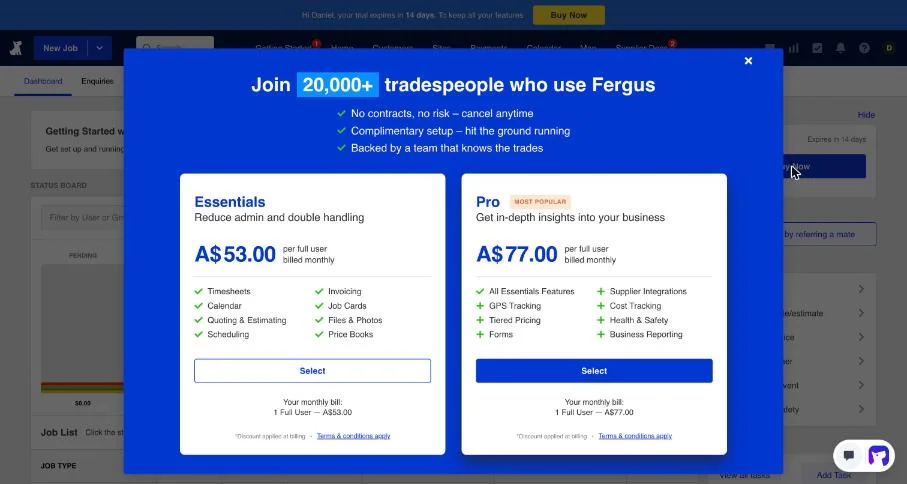
Fergus plans: Essentials vs Professional
Essentials covers quoting and estimating with price books, job cards, scheduling, timesheets, materials, recurring jobs, enquiry management, the app, invoicing, Fergus Pay and accounting sync. Supplier invoices come in “manually”. Support is email and chat.
Professional (Pro in the app) adds checklists, forms, tasks, purchase orders, tiered pricing, hazards and SWMS, automatic supplier integrations, GPS tracking, the fuller reports and phone support.
So if you need SWMS, forms or automatic supplier imports, budget for Professional.
Fergus timesheet users: cheaper, with a catch
Timesheet users (from A$26) suit apprentices and casuals. They can see their own jobs, log time, fill in forms and checklists on their jobs, and add hazards, but Fergus’s help says they “cannot upload photos or files to the job card” (Fergus). If your field staff take job photos, price them as full users.
Fergus add-ons
- Certificates: A$30 a month for 1–9 staff, A$80 for 10 or more (NZ$50 and NZ$100 in NZ). Free during the trial.
- SMS: A$15 per 100 texts.
- Card payments (Fergus Pay): 1.95% plus 30c for standard Australian cards. Since 1 October 2026 you can’t surcharge eftpos, Mastercard or Visa payments in Australia, so that fee comes out of your price.
- Premium supplier integrations (Reece, Tradelink, Actrol, Metalflex): the trial labels them “premium” but doesn’t show a price. Ask Fergus before you count on one.
Fergus cost by team size
| Team | Fergus | Tradify Pro | ServiceM8 |
|---|---|---|---|
| 1 person, Essentials | A$53 | A$52 | A$26.36 (Starter) |
| 3 people, Essentials | A$159 | A$156 | A$71.82 (Growing) |
| 3 people, Professional | A$231 | A$156 | A$71.82 (Growing) |
| 3 full users + 3 timesheet users | A$237 | A$312 (6 users) | A$135.45 (Premium) |
| Electrician, 3 people, Professional + certificates | A$261 |
Monthly subscription, ex GST, which is what a GST-registered business pays after GST credits. Tradify doesn’t charge GST to GST-registered Australian businesses; ServiceM8’s prices include GST, so it’s taken out here.
The Fergus “90% off til December” offer
Fergus’s pricing page has a banner: “Get 90% off til December”. Fergus hasn’t published terms for Australia or New Zealand. The plan window in the app says only “Discount applied at billing • Terms & conditions apply”, and the billing page has a field for a promo code. Fergus’s terms say a promotion applies from your first invoice to the end of the promotional period, for new customers only. Because Fergus bills in arrears, a discount ending in December may only cover one or two invoices for someone signing up now. Budget on the full price and ask Fergus which invoice months it covers.
Fergus price increases
Fergus’s Australian prices have risen twice in about 14 months:
| When | Essentials | Professional | Timesheet user |
|---|---|---|---|
| June 2025 | A$44 | A$65 | A$20 |
| December 2025 | A$48 | A$72 | A$22 |
| By August 2026 | A$53 | A$77 | A$26 |
That’s 20% on Essentials and 18% on Professional. On its main (NZ-dollar) pricing page, Basic was NZ$30 in 2019 and is NZ$53 now. Some Fergus pages and campaign landing pages still say “from $44”.
Fergus setup: what signing up asks
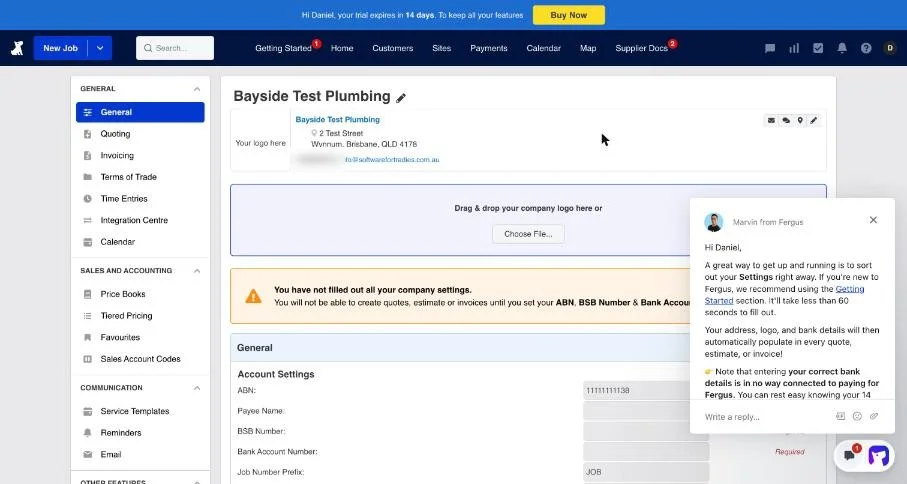
A new account opens on a Getting Started page of five steps, which Fergus says take about 30 minutes:
- A two-minute welcome video.
- Four short feature videos: create a job, a quote, an invoice, and get paid.
- Example data. The account comes loaded with example customers, sites and jobs, each marked “[EXAMPLE]”, so you can click around a job that’s already been quoted, scheduled and invoiced. One button removes them all. Neither ServiceM8 nor Tradify does this.
- Your business details: address, phone, email, website, ABN (required), BSB and bank account number, and your logo. Everything saves as you type, and you can skip the bank details and logo.
- Connect your accounting software: Xero, MYOB or QuickBooks. “Skip step” opens a form asking which other software you use, with no “later” option, so we left the step open.
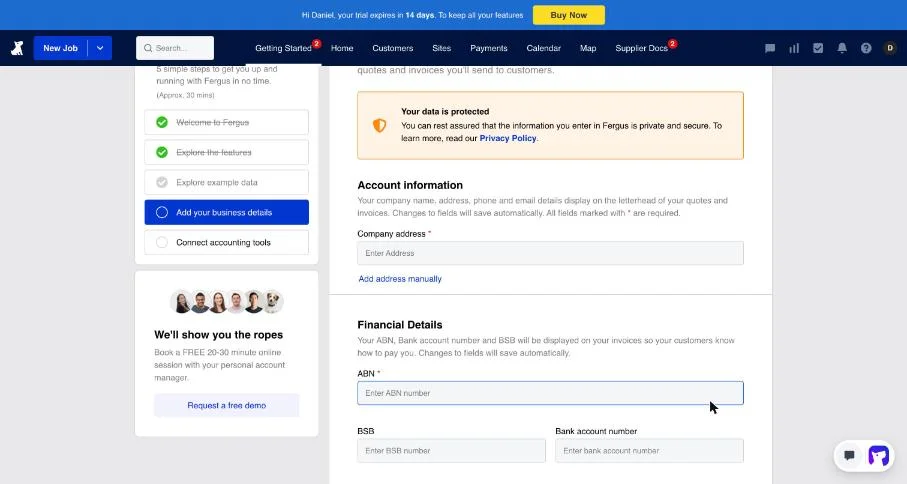
ServiceM8 asks for your logo when you sign up and Tradify’s checklist asks for your ABN; Fergus asks for both, plus your bank details, in one step. The defaults were right without us touching them:
- GST at 10% is the default tax rate, so the first quote charged GST correctly;
- the time zone was set to Brisbane;
- the labour rate starts at A$110 an hour sell (A$40 cost), where Tradify’s starts at A$0.
Fergus also gets in touch quickly. A chat message from Fergus arrived within minutes of signing up, asking about our biggest admin headache, and three messages from named Fergus staff came in the first 40 minutes. A free 20–30 minute session with an account manager is offered on the Getting Started page.
Three things to know:
- Ignore the bank details warning. Settings → General says “You will not be able to create quotes, estimate or invoices until you set your ABN, BSB Number & Bank Account Number.” We created, emailed and approved a quote and an invoice with no BSB or account number. A banner on the invoice says “You are using sample business information”, but it didn’t stop anything. Your invoice does say “Please make deposits to our bank account number as specified”, so add your bank details before you send real ones.
- Old quotes get archived. By default, expired quotes and jobs with no activity go “stale” after 60 days, and stale jobs are archived 30 days after that. Change it under Settings → General → Automatic Job Cleanup if you chase quotes for longer.
- Xero won’t connect to its demo company. More on this in the Xero section below.
Fergus hands-on test: one job from quote to invoice
Quoting a job in Fergus
From a blank job screen to the quote emailed took about three minutes: add the customer, pick “same as customer” for the site, switch on “This job needs a Quote or an Estimate”, give the job a title, and you land straight in the quote. (The same job took about eight minutes in Tradify.)
The quote editor shows cost, price and markup for each line, with sections you can show to the customer as a fixed price or itemised. Typing “labour” pulled in the standard labour rate from the price book. We didn’t have a supplier price list connected, so the tap went in as a typed line. A$289 for the tap plus A$120 of labour came to A$409 plus A$40.90 GST: A$449.90.
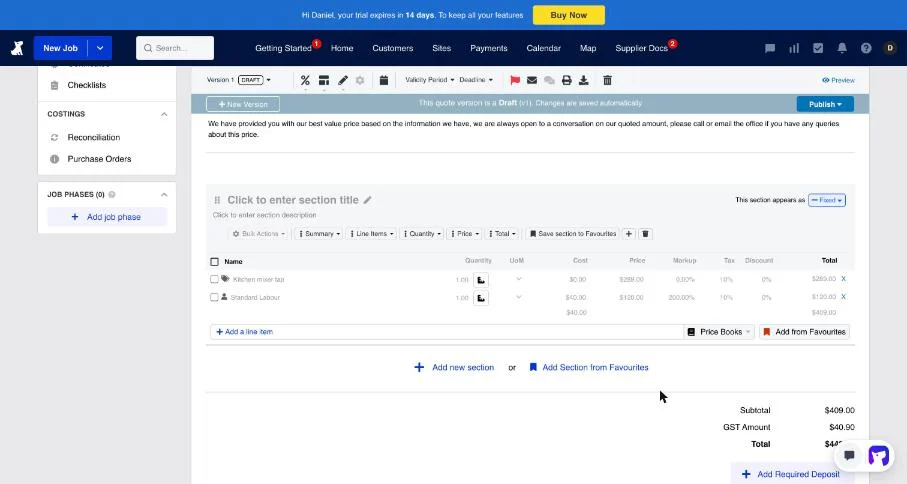
The quote email has a “View this Quote” button, the totals and an expiry date about 59 days out. An AI Helper in the email editor can rewrite the message. The quote itself prints your business name, address, phone, email and ABN, which Tradify’s didn’t.
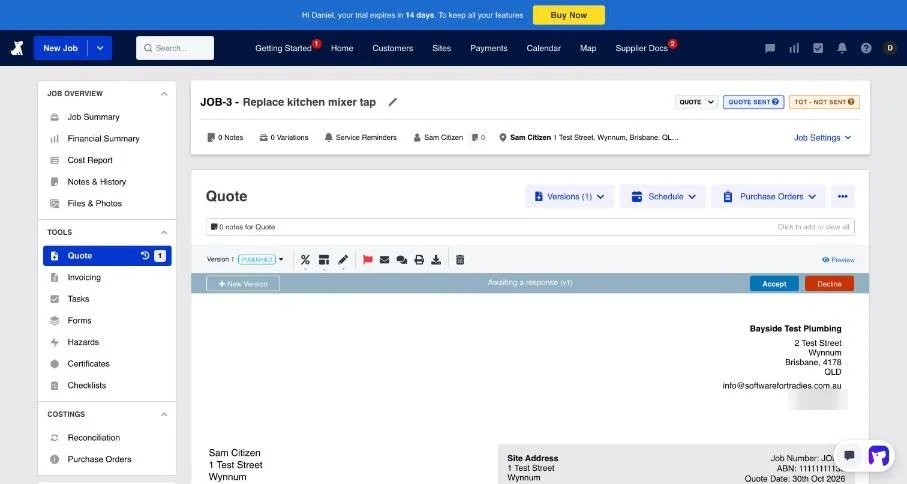
We accepted the quote with the office Accept button rather than as the customer, so we didn’t see Fergus’s customer quote page. Accepting also accepts your terms of trade, makes the job active and creates the first job phase, ready to schedule. Booking is on a staff calendar where you draw the time on the person’s row.
Invoicing from the quote
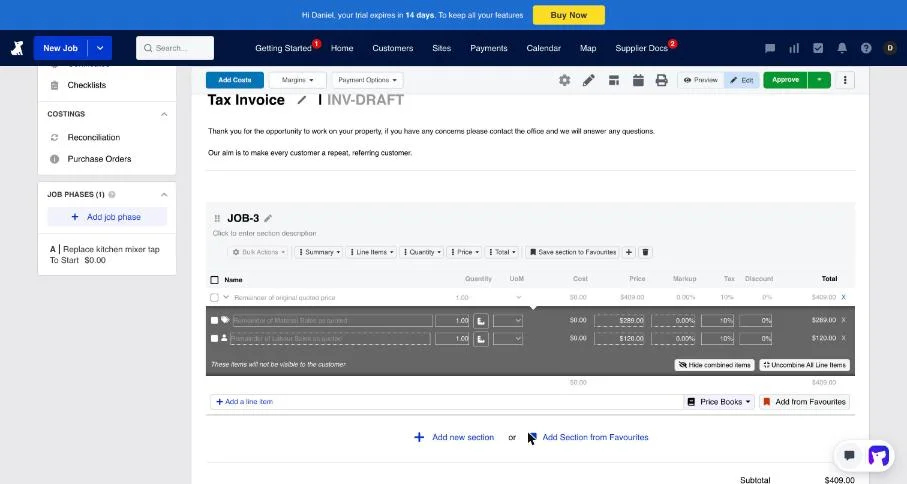
“Invoice from Quote” lets you bill a percentage of the quote (for progress claims), the remainder, or chosen sections. We billed the remainder: about a minute from there to the invoice emailed, with the total right at A$449.90.
One thing to check: by default the customer’s invoice shows a single line, “Remainder of original quoted price A$409.00”. The tap and labour lines are hidden underneath (“These items will not be visible to the customer”), and “Uncombine All Line Items” shows them. If your customers expect an itemised invoice, change it before you send.
Supplier invoices: the test that matters most for Fergus
This is Fergus’s main draw for plumbers and electricians. Supplier invoices come into Fergus and land on the right job, so materials are costed without re-keying, and price files keep your price book current.
We didn’t have a real Reece account, so we made a supplier invoice PDF for our job: a A$180 tap and two flexi hoses, A$218.90 including GST, with our job number as the reference. Uploading it asks which supplier it’s from. We picked Fergus’s Generic PDF Invoice Reader (it also lists 24 Australian suppliers by name).
It read every field right in about 15 seconds: supplier, date, invoice number, our job number, both lines with their codes, quantities and prices, and the GST. It also filled in sell prices at a 60% markup. Assigning it to the job is one click.
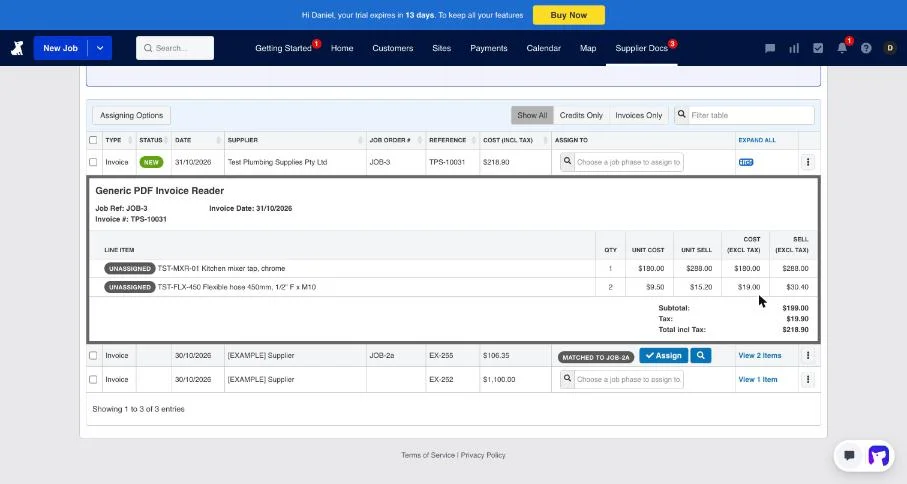
It didn’t match itself to the job, though, even though it had read the job number. We think that’s because we’d already invoiced the job, and Fergus warned that costs added after invoicing “will not be correctly back-costed”. In real life the supplier bill usually lands before you invoice. Afterwards Fergus flags the invoice with “Unallocated costs: Review and invoice the new costs”, which is handy for do-and-charge work, but on a fixed-price job it’s nudging you to bill parts that were already in the price.
What’s available depends on your country and supplier:
| Where | Suppliers | What comes in |
|---|---|---|
| Australia, plumbing | Reece, Tradelink | Invoices and price books (premium integrations) |
| Australia, electrical | Rexel, Ideal Australia, John R. Turk, Lear & Smith (Rexel Group); L&H; Middy’s | Rexel Group: invoices and price files by email. Middy’s: invoices |
| New Zealand | Mico, J.A. Russell, Corys, Plumbing World, Bunnings Trade and more | Deeper links, including price books and purchase orders |
| Any supplier | Email forwarding or the PDF invoice reader | Invoices |
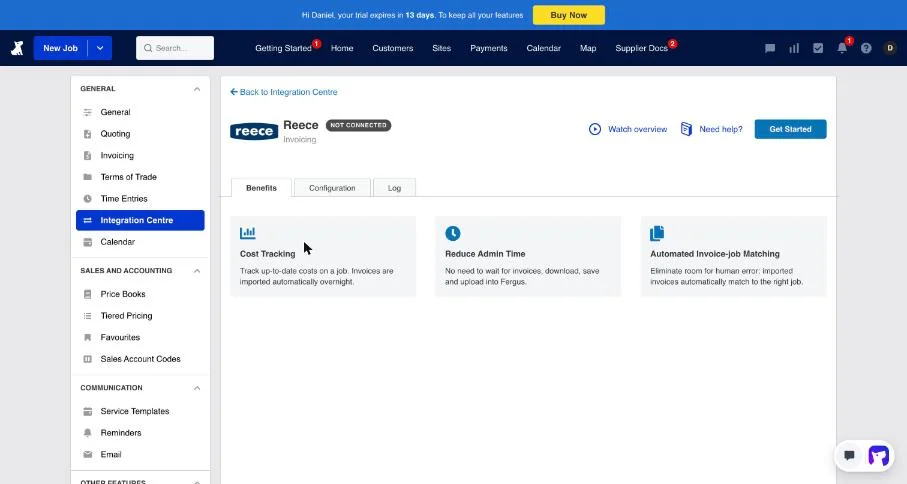
Sources: Fergus Integration Centre, Rexel Group setup and the Integration Centre in our trial. Fergus’s help says its premium supplier links are “only available for NZ suppliers unless stated otherwise”, but our trial listed Reece, Tradelink, Actrol and Metalflex as premium integrations for Australia, with Reece invoices “imported automatically overnight” and matched to the job. Connecting one needs a trade account with that supplier.
Job profit as you go
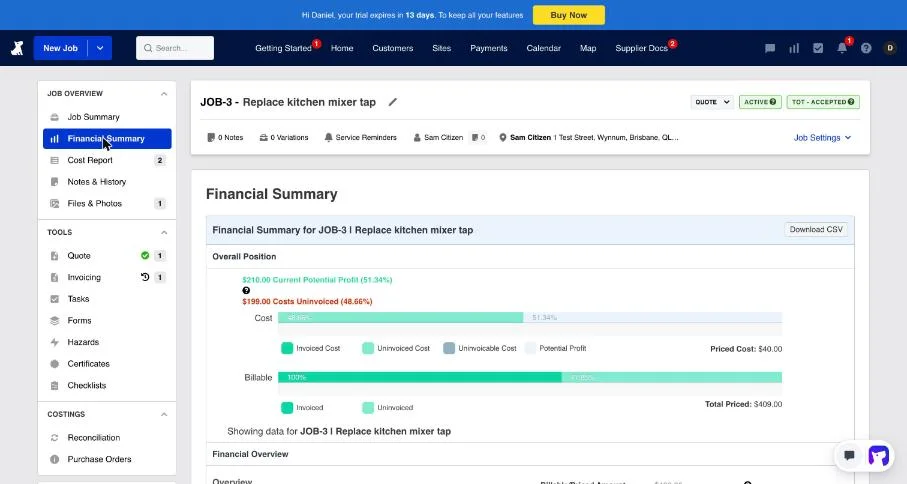
Once the supplier invoice was on the job, the job’s Financial Summary showed A$210 profit (51.34%): A$409 billed less A$199 of materials, with no labour cost yet because we hadn’t logged time. It splits labour and materials, priced against invoiced against cost, and downloads to a CSV. Across the business, Fergus’s dashboard pulls your overheads and cost of sales from Xero, so you see job margins and whole-business profit together. Fergus suggests a year of clean Xero data before you trust the margin numbers.
Certificates in practice
For electricians and plumbers, Fergus’s Certificates add-on covers NSW and Queensland in Australia, and New Zealand (Fergus):
- NSW: the Certificate of Compliance for Electrical Work (CCEW). Since August 2026, NSW only accepts CCEWs lodged online, and Fergus lodges them directly with Building Commission NSW, with no separate login. This is on the web app only, not Fergus Go.
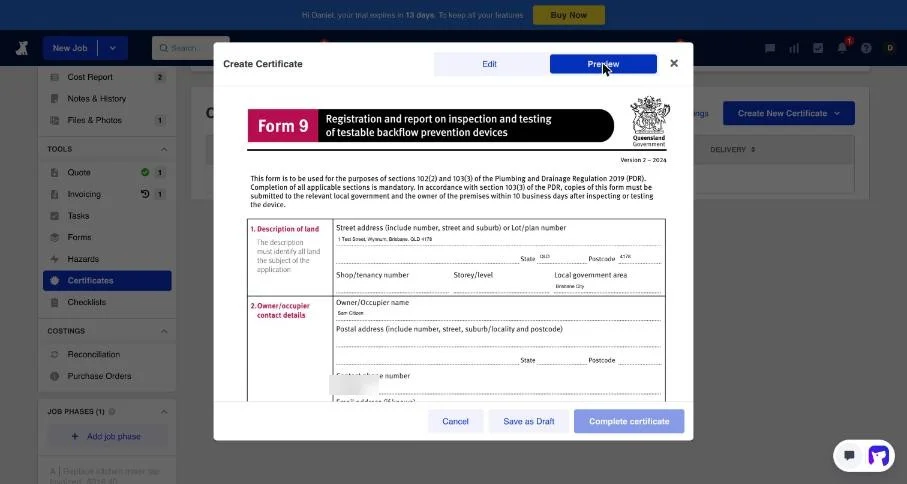
- Queensland: 13 forms in our trial, covering plumbing and drainage (Forms 1, 2, 3, 5, 6, 7, 8, 9, 11, 12 and 14), gas compliance and electrical testing. They’re switched off until you turn them on in Settings, and each staff member gets their own licence number.
- Other states: none listed.
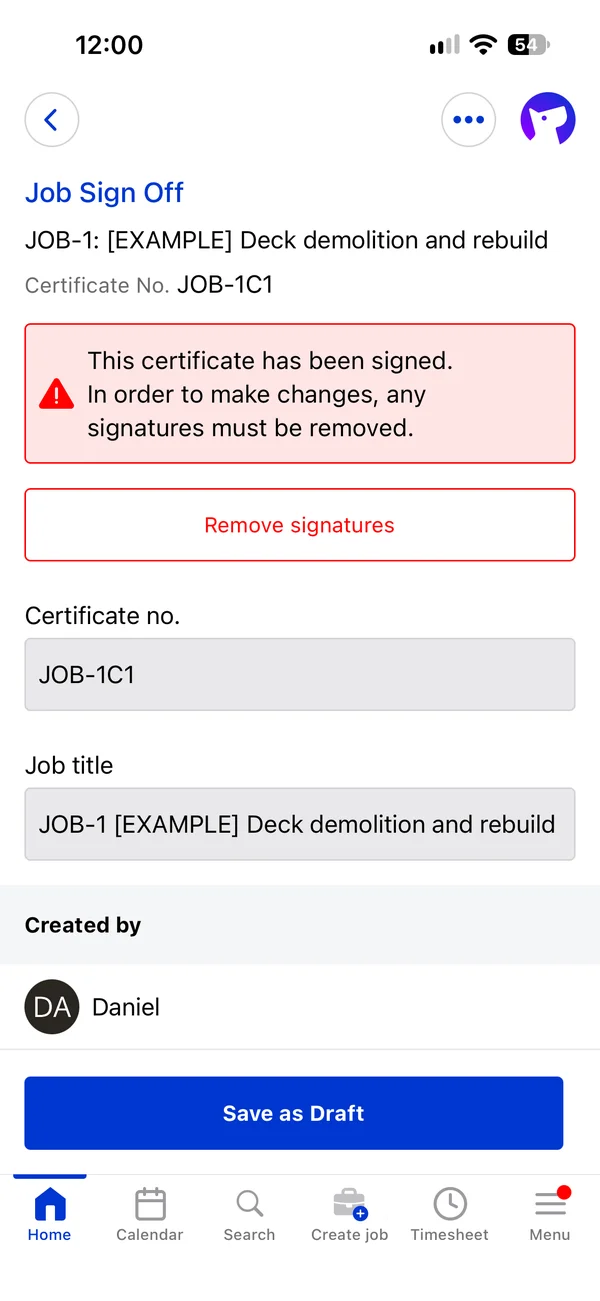
We filled in a QLD Form 9 (testable backflow devices) for our job. It pulled in the site address, owner and tester details from the job, and the preview is the official Queensland Government form, three pages, with our answers in the right boxes. It took about four minutes. We saved it as a draft rather than completing and sending it. On the phone, a generic Job Sign Off certificate took the customer’s finger signature and then locked itself until the signature is removed.
One of the top-ranking Fergus reviews says Fergus has no CCEW form. Fergus’s own help says otherwise, as of July 2026.
The Fergus Go app on iPhone and Android
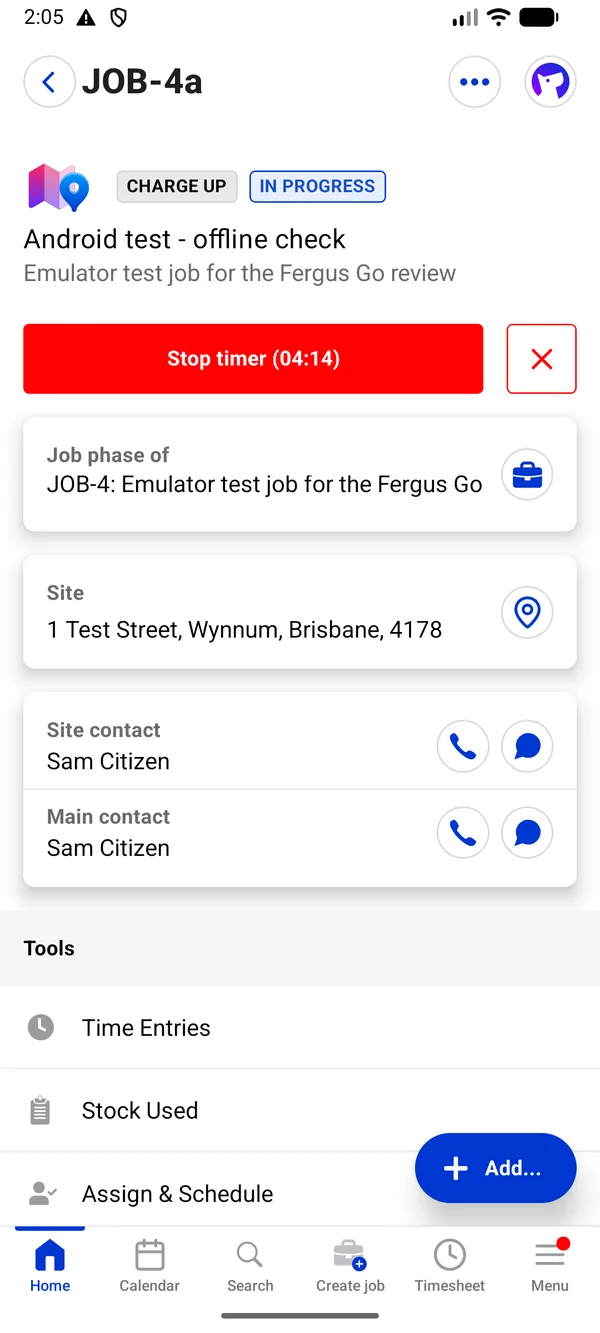
Fergus Go is the same app on iPhone and Android: a schedule with Scheduled, Assigned and Unassigned tabs, and Calendar, Search, Create job, Timesheet and Menu along the bottom. Logging in sends a code to your mobile.
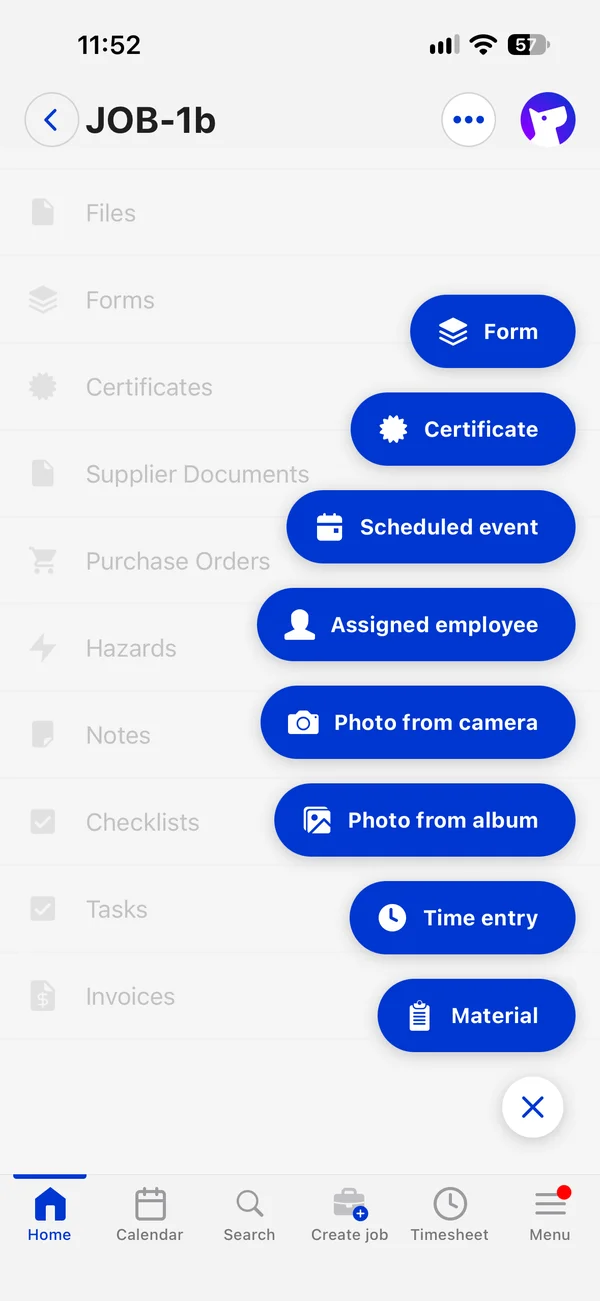
On a job you get a big Start timer button, the site with a map pin, the contacts, and an Add… menu: form, certificate, scheduled event, assigned employee, photo from camera, photo from album, time entry and material.
- Photos from the gallery work on iPhone. ServiceM8’s Android app wouldn’t take one in our test.
- The timer stops into a time entry with the start and end filled in and a required work description. Saving asks “Is all your work on this Job Phase complete?” Time is rounded up to 15 minutes on the job’s costs.
- Notes can tag other staff and be pinned to the top of the job.
- Creating a job on the phone took about 30 seconds on Android, with the same customer and site lookup as the web.
- On Android, the camera hands off to the phone’s own camera app rather than an in-app one.
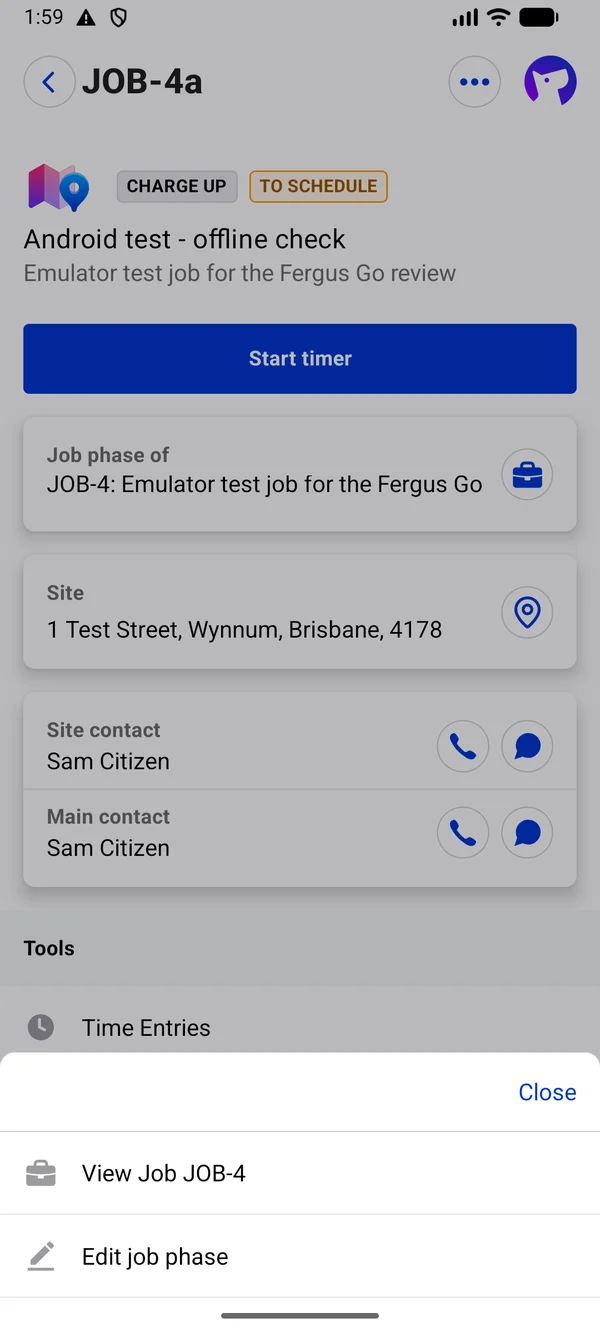
No “on my way” text. With a mobile on file, each contact has call and message buttons. The message button opens the phone’s own texting app with the number and a blank message: no template, no arrival estimate, and nothing saved in Fergus. ServiceM8 sends an “on the way” text with a live arrival estimate and a tracking link, and Tradify at least fills in “I’m on my way”.
Invoicing from the phone
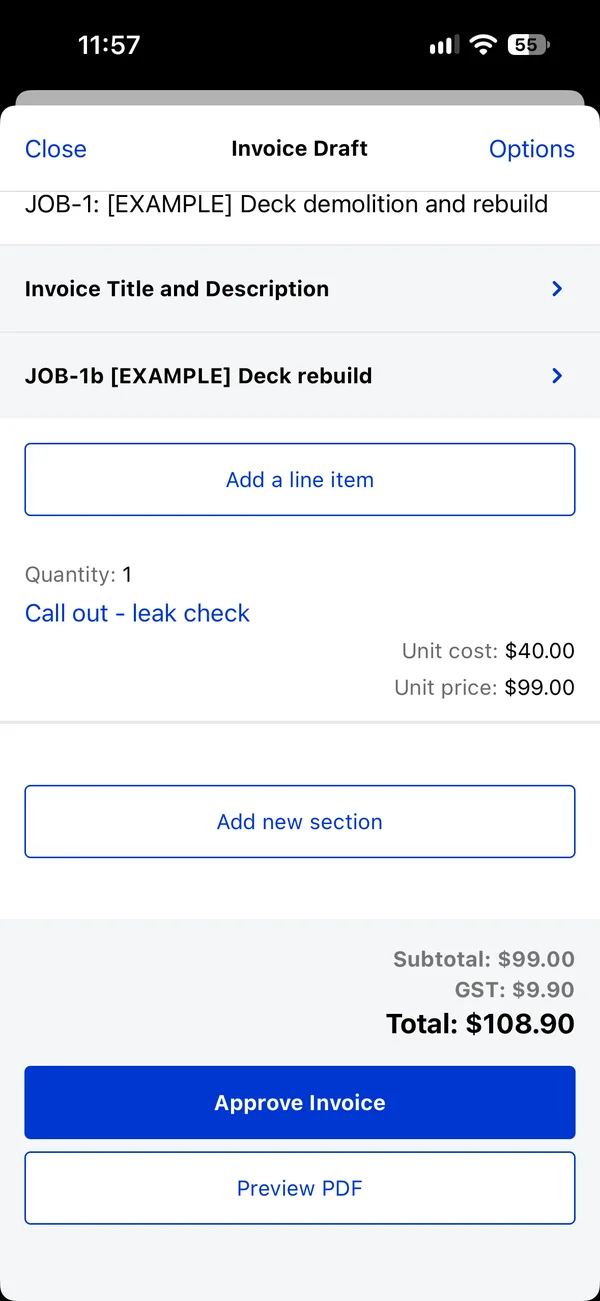
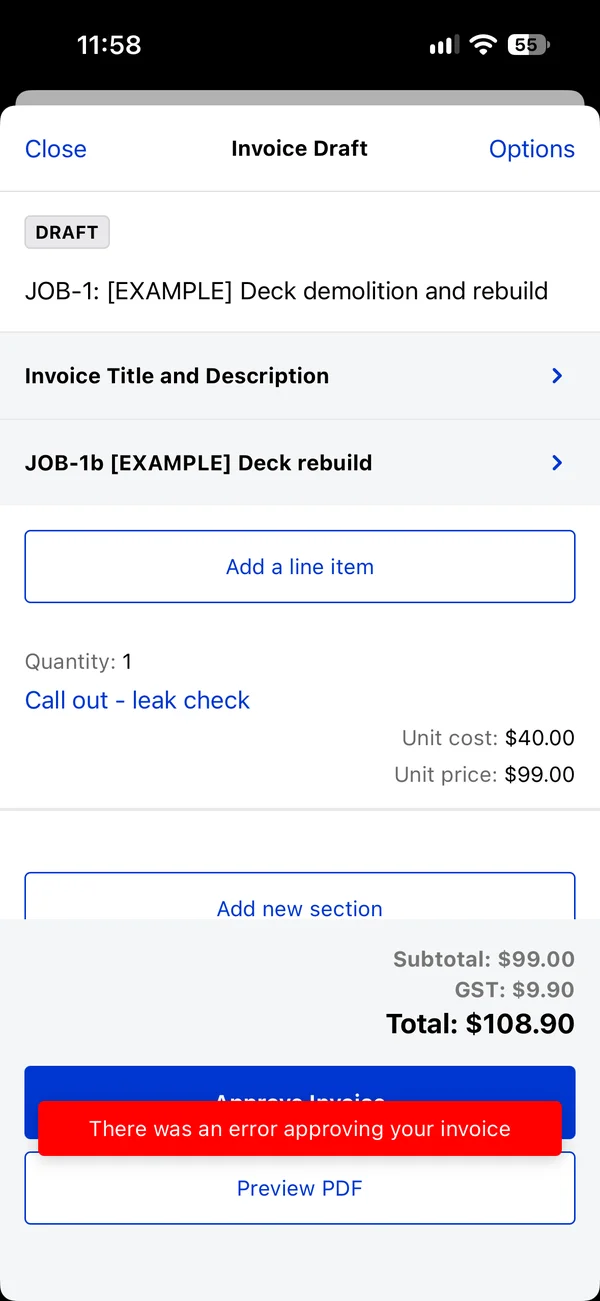
Quick Invoice on a job lets you add a line from your price book or type one in. Our A$99 call-out went in as ex GST, so it came to A$108.90, and the PDF preview is the real tax invoice. Approving it showed a red “There was an error approving your invoice”, but the invoice had been created and approved anyway, and we could email it.
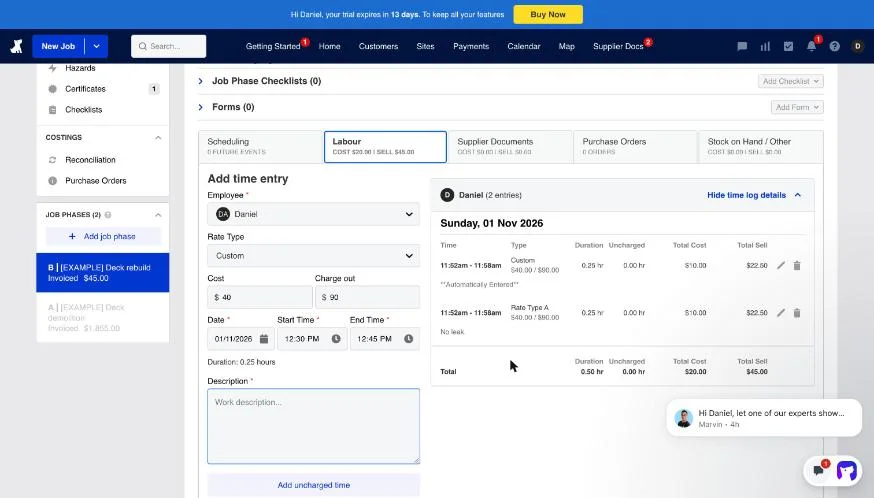
Watch the timer when you invoice on site. We approved that invoice with the timer still running. Approving marks the job complete, and Fergus logged the running time itself, marked “Automatically Entered”. Stopping the timer a minute later logged the same six minutes again. Each was rounded up to 15 minutes, neither was on the invoice, and the job was flagged for unallocated costs. Stop the timer before you invoice.
Fergus offline mode: what still works
Fergus Go’s offline mode came out of beta in August 2026. Fergus says time entries, job notes and photos queue offline and sync when you’re back in range. We tested it on both phones, with flight mode on and Wi-Fi off.
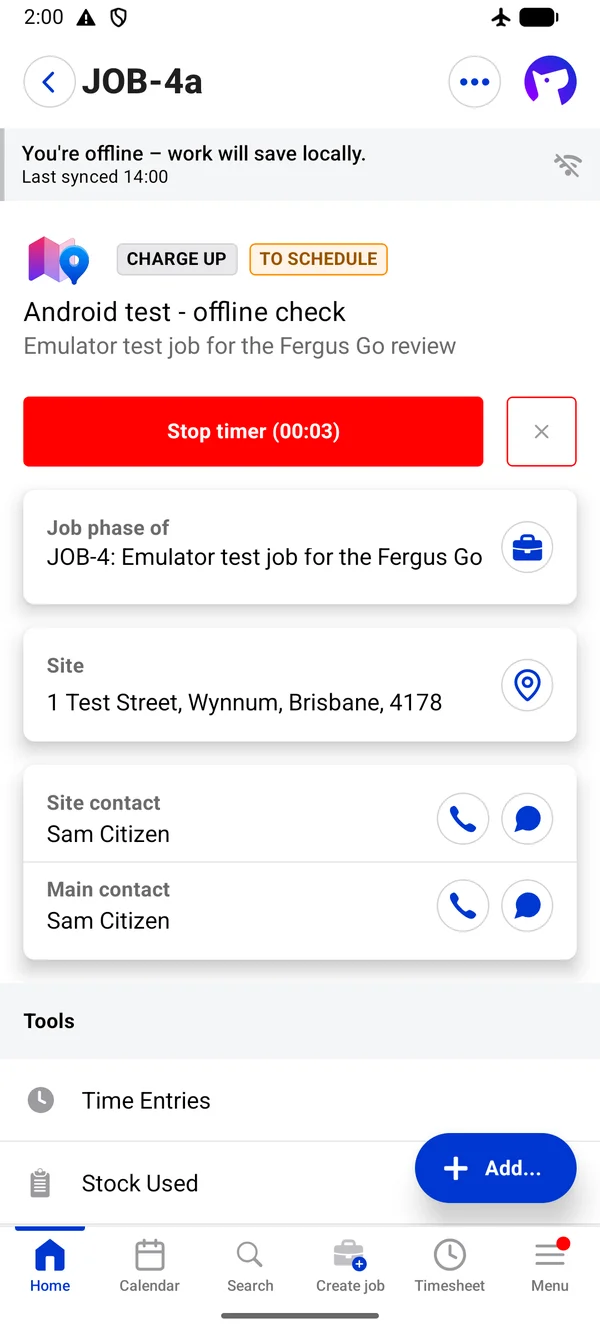
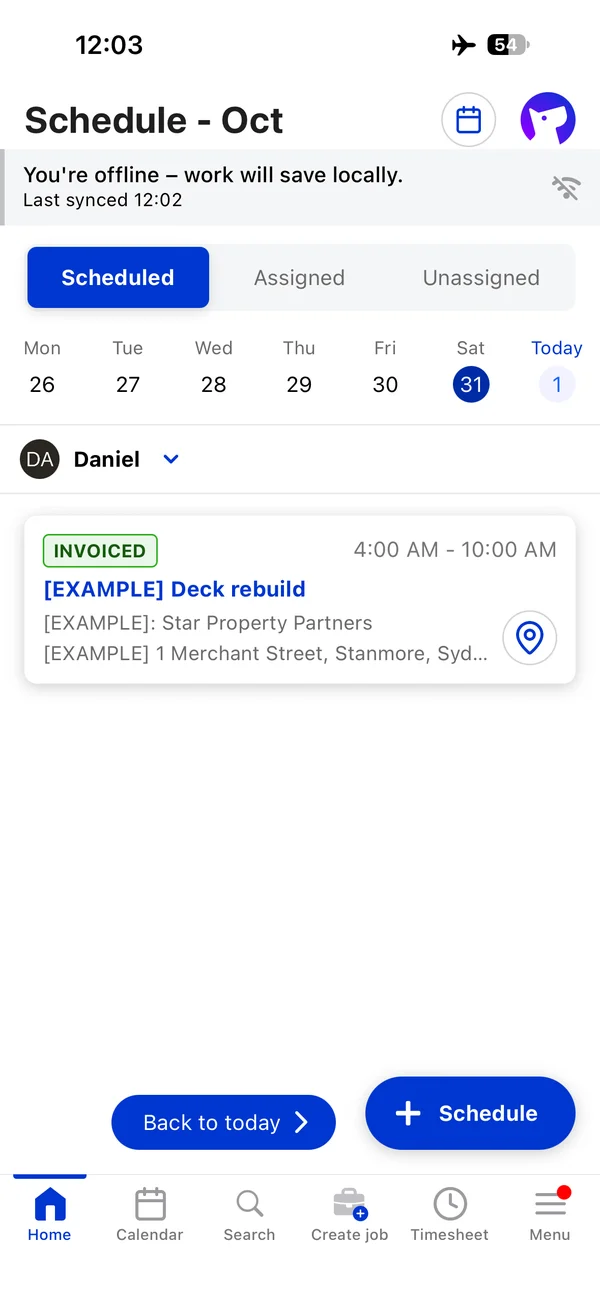
With a job already open, it works. A banner says “You’re offline – work will save locally” on every screen. On the iPhone we added a note; on Android we started the timer and took a photo. Everything was there on the web once we reconnected. The timer even kept running through the app being closed and reopened.
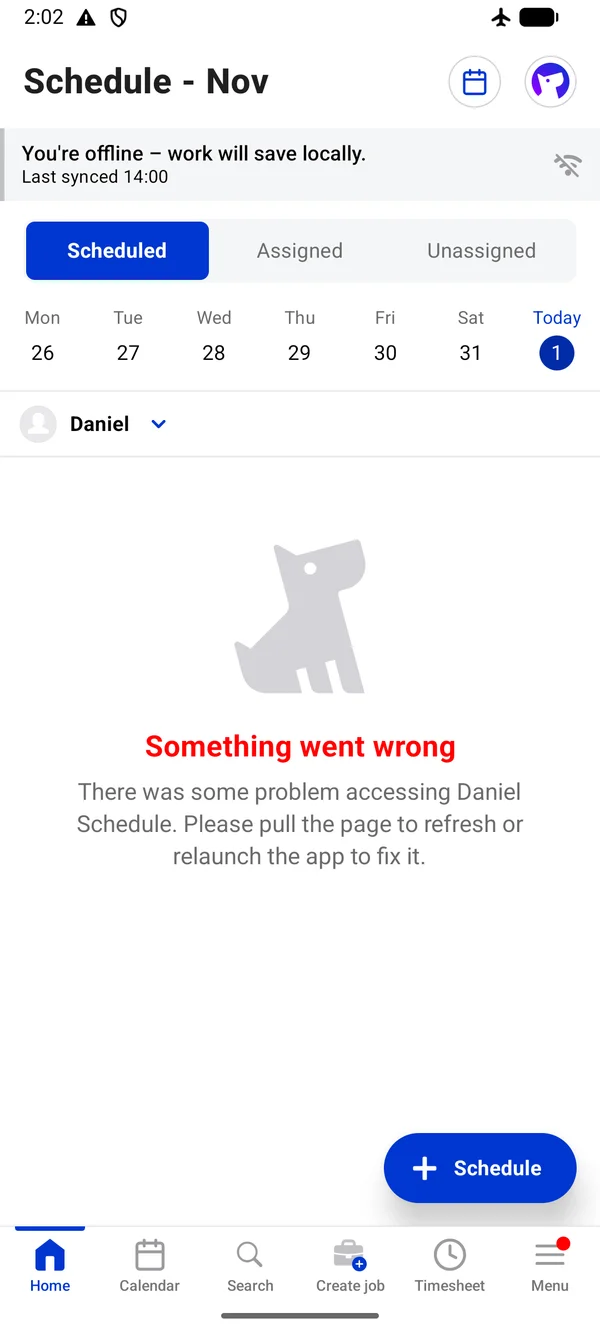
Reopen the app with no signal and you can’t get to your jobs. On Android, after closing the app and opening it again offline, the schedule and job lists showed “Something went wrong… Please pull the page to refresh or relaunch the app”, and search spun without finding anything. Our test job wasn’t scheduled for that day, so a job on today’s schedule may behave better, but don’t count on it.
Offline work is stamped with the time it synced. Our note written at 12:03 shows as 12:04, and a timer started at 2:00 shows in the job history at 2:04. The time entry itself kept the right times.
That’s better than Tradify, which wouldn’t open or save a note offline. It’s short of ServiceM8, which works fully offline. Quoting, invoicing, forms and certificates aren’t documented as working offline.
Fergus app ratings
Fergus Go rates well overall, but its recent low-star reviews are mostly about speed and reliability:
| Where | Fergus rating |
|---|---|
| Apple App Store (Australia) | 4.55 from 564 ratings |
| Apple App Store (New Zealand) | 4.56 from 959 ratings |
| Google Play (worldwide) | 4.42 from 866 ratings |
| Xero App Store (Australia) | 4.41 from 79 reviews |
| Capterra | 4.6 from 155 reviews |
Of 93 written app-store reviews since 2024 that we pulled, 43 were 1 or 2 stars, and half of those were about crashes, slowness or bugs: “stuck on a forever load screen” (October 2026), and an employee saying it was “deleting my certs and timesheets half way through” (September 2026). One plumber’s positive Xero App Store review (March 2026): “invoices from Reece align with my jobs”. We didn’t see crashes in our test.
Fergus has more ratings on the New Zealand App Store than the Australian one, despite Australia being the bigger market. It’s named in 10 of 60 New Zealand job ads that name a job app, against 15 of 468 in Australia.
Fergus Xero integration and accounting
Fergus sends customer invoices to Xero on approval, using separate sales codes for labour and materials, sends supplier invoices and credits as bills, and marks invoices paid when they’re paid in Xero. It also works with MYOB and QuickBooks. There’s no Xero Payroll timesheet sync; you export a pay summary. See job management software that works with Xero.
Fergus Xero sync test
It wouldn’t connect to Xero’s demo company. ServiceM8 and Tradify both connected to the same Xero Demo Company. Fergus showed it as connected, then said “Another Fergus account is already attached to this Xero account”, and the account pickers in its setup had no Xero accounts to choose. Reconnecting gave a message that we’d connected the demo account. So you can’t try Fergus’s Xero link on Xero’s dummy data. We started a free Xero trial organisation instead, which worked.
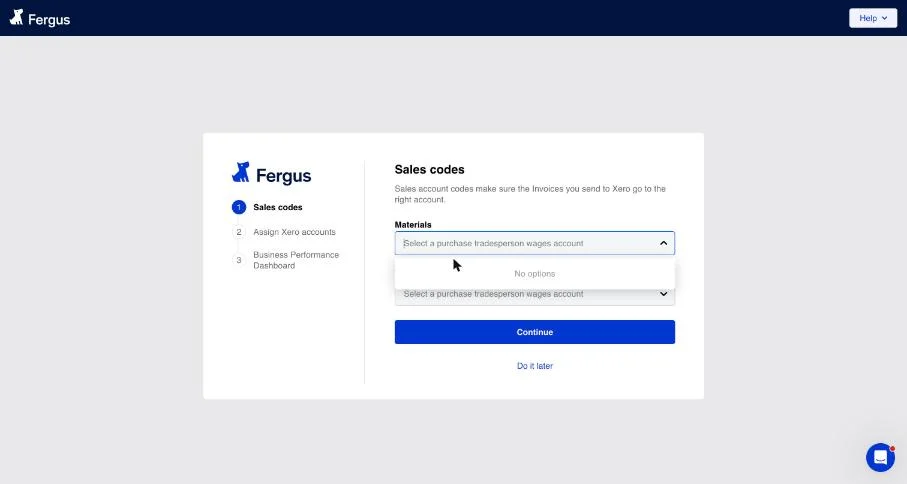
Setup took about a minute: choose Xero accounts for materials and labour sales, purchase invoices and supplier credits, and wages (for Fergus’s profit dashboard).
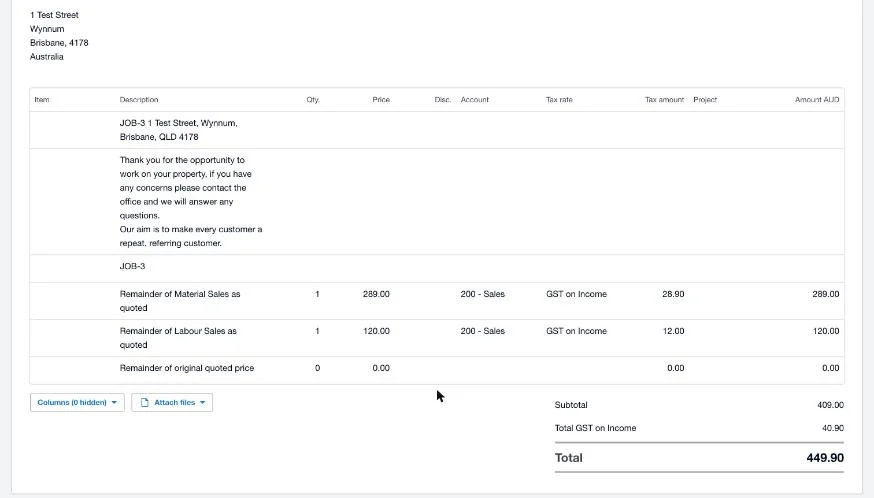
Invoice to Xero: 15 seconds. Our invoice had been approved before we connected Xero, so it didn’t go across by itself. The invoice menu has Resend to Xero, and the invoice was in Xero 15 seconds later. The customer was created with their address, the reference carried the job number, and materials (A$289) and labour (A$120) came through as separate lines, both coded to Sales with GST on Income, even though the customer’s copy showed one line. Total A$449.90.
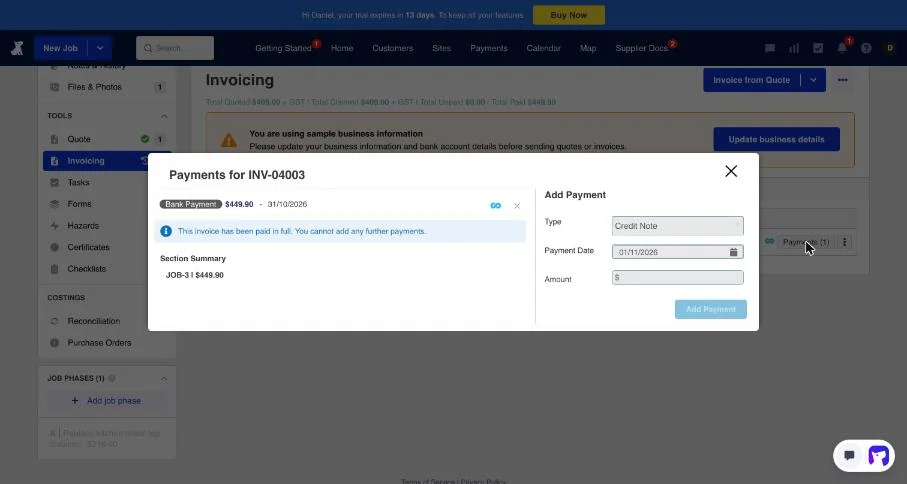
Payment back to Fergus: only after a manual refresh. We recorded the full payment in Xero at 7:57 am. Fergus still showed the invoice unpaid 13 minutes later. When we pressed Refresh Data in Fergus’s Xero settings, it showed as paid within seconds, and the job dropped off the Payments column on the dashboard. We can’t tell you whether Fergus would have picked it up on its own, or how long that takes; its help pages don’t say. ServiceM8 brought a payment back in under five minutes and Tradify in eight, both without us doing anything. The payment also showed in Fergus dated 31 October, a day before the 1 November date we entered in Xero.
One more: an invoice we approved on the phone, on one of Fergus’s example jobs, never reached Xero. Fergus’s other example invoice didn’t either, so we think example jobs don’t sync, but we couldn’t confirm it.
Fergus cons: where it falls short
- Per-user price, plus GST, rising. See the pricing tables above. A crew of three on Professional pays more than three times ServiceM8.
- No “on my way” text from the app.
- Offline only for jobs you’ve already opened.
- Slow payments back from Xero in our test, and no Xero demo company.
- No stock control. Fergus doesn’t track stock levels: “We do not support inventory sync”. It has purchase orders on Professional and an integration with FieldStockPro if you need stock.
- Billing in arrears. You get a final invoice after you cancel for the time you already had. If you downgrade or remove a user, they’re billed as a full user until the end of the month.
Fergus support and your data
Support. Essentials includes email and chat; Professional adds phone support. During the trial Fergus was quick to make contact (see setup above), and the help centre is detailed. We haven’t put a question to Fergus’s support yet, and we’ll add the result here when we do.
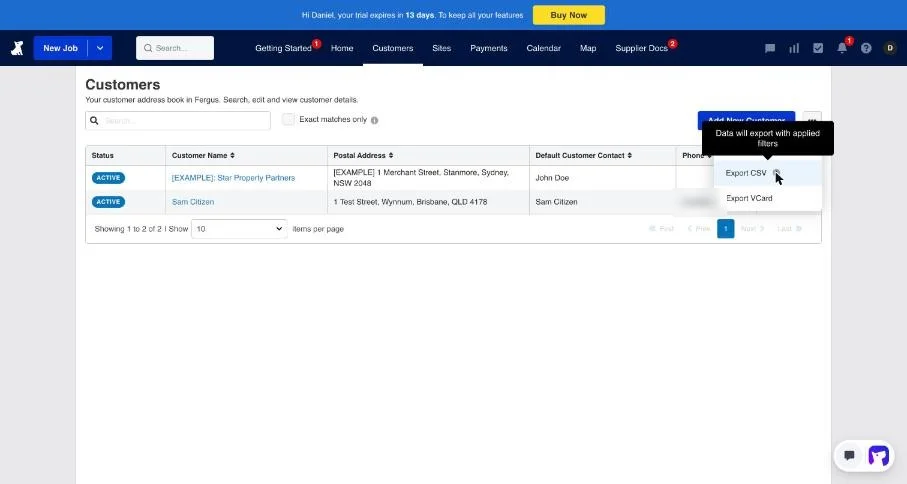
Getting your data out. From the Customers list you can export a CSV or vCards. Reports, including a customer invoice report and each job’s financial summary, download as CSV. But the Jobs and Invoices lists have no export button. For everything, Fergus’s help says a full user can request a full data export, which Fergus prepares and sends as a compressed file (Fergus).
Do that before you leave. Fergus’s terms say you’re responsible for keeping your own copy of your data, a trial account’s data is removed within 30 days of the trial ending, and a cancelled account is locked unless you pay again (Fergus).
Fergus in New Zealand
The entry plan is called Basic in New Zealand (from NZ$53) with Professional from NZ$75, timesheet users from NZ$26, card payments at 2.95% plus 30c and certificates at NZ$50 a month. Supplier links are deeper in NZ than in Australia, and Fergus is the second most-named job app in NZ trade job ads after Simpro.
Who is Fergus best for?
- Strong fit: plumbers and electricians with crews of three to ten who buy a lot through Reece, Tradelink or the Rexel Group brands, and want job and business profit in one place. In NZ, the supplier fit is even better.
- Good fit: NSW and Queensland electricians and Queensland plumbers who want certificates in their job app.
- Look elsewhere: sole traders watching every dollar (ServiceM8’s Starter is half the price), crews working out of range all day, businesses that want “on my way” texts, and anyone who needs stock control. See ServiceM8 alternatives.
Fergus FAQs
How much does Fergus cost? From A$53 per user a month on Essentials and A$77 on Professional, plus GST.
Is Fergus per user? Yes. Its terms say fees are charged “on a per user basis”, with cheaper timesheet-only users.
Does Fergus work offline? In part. Notes, photos and the timer on a job you’ve already opened keep working and sync later. Reopening the app with no signal, we couldn’t get to any jobs.
Does Fergus work with Xero? Yes. Invoices went to Xero in 15 seconds in our test, with labour and materials split. A payment made in Xero only showed in Fergus after we pressed Refresh Data.
Does Fergus send “on my way” texts? Not from the app. The message button opens your phone’s own texting app with a blank message.
Who owns Fergus? It’s a private New Zealand company, Fergus Software Ltd, with an Australian company, Fergus Software Pty Limited.
Written by Dan Edwards
Dan sets up job management, call tracking and CRM systems for trade businesses. More about Dan.