 AroFlo
 Simpro
 Tradify
Head to head
Fergus vs ServiceM8 (2026): which suits your trade business?
Fergus vs ServiceM8 for Australian and NZ tradies: per-user vs per-job pricing worked out, supplier links by wholesaler, offline, card fees, Android, and who each suits.
By Dan Edwards · Updated
Some links on this page earn a commission if you sign up. It never changes the order or the verdict. How we keep the lights on.
On this page
We tested both on their 14-day trials: ServiceM8 from 29 October 2026 and Fergus from 30 October, each on the web, on an iPhone and on an Android emulator. We ran the same made-up Brisbane plumbing job through both and connected each to Xero. The full results are in our ServiceM8 review (SFT score 8.1) and Fergus review (7.0).
Short answer
Pick ServiceM8 if you have three or more people doing lots of short jobs, take card payments, or work out of range. It’s cheaper for most crews, works fully offline, and has lower card fees.
Pick Fergus if you’re a plumber or electrician buying a lot through Reece, Tradelink or the Rexel Group brands and you care about job margins. Its supplier invoice links and profit reports are its edge, and it’s cheaper for one or two people doing a lot of jobs.
 FergusTestedOCT 2026 |  ServiceM8TestedOCT 2026 | |
|---|---|---|
| Best for | Plumbers and electricians running crews of 1–20 | Small teams doing lots of short jobs |
| Price from | From A$53 per user/mo + GST (Essentials), A$77 (Professional) | Free (30 jobs/mo), then A$29–349/mo inc GST |
| How it’s priced | Per full user, plus cheaper timesheet-only users (from A$26/mo + GST) | Flat per business, tiered by jobs per month. No per-user fees |
| Free trial | 14 days, no card, no setup fee | 14 days, no card, no lock-in |
| Runs on | iPhone, Android, web. Partial offline (time, notes, photos on jobs already open) | iPhone, Android, web. Works offline |
| Accounting | Xero (invoices out, payments back). MYOB, QuickBooks | Xero two-way (contacts, items, payments). MYOB, QuickBooks |
| Try Fergus → | Try ServiceM8 → |
Fergus vs ServiceM8 at a glance
| ServiceM8 | Fergus | |
|---|---|---|
| How you pay | Per business, by new jobs a month; unlimited users | Per full user, cheaper timesheet-only users |
| From | Free (1 user, 30 jobs), then A$29/month inc GST | A$53 per user/month + GST (Essentials) |
| Works offline | Yes, fully (ServiceM8’s claim; not yet tested by us) | Notes, photos and the timer, on a job you’d already opened |
| Supplier links | Any supplier by email (PDF invoices, CSV price files); Reece maX add-on | 39 Australian wholesalers listed; Reece and Tradelink as premium links |
| Purchase orders | No | Professional plan |
| Stock control | No (from your accounting software) | No |
| Forms and certificates | Form Store on all plans; custom forms from Growing | Forms on Professional; certificates add-on (NSW, QLD, NZ) |
| Card fee (standard AU card) | 1.89% down to 1.19% + 30c by plan | 1.95% + 30c |
| API and Zapier | Yes | Yes |
| Built in | Australia | New Zealand |
From each vendor’s pricing and help pages, checked 26 October 2026.
Fergus vs ServiceM8 pricing: per user vs per job
The two charge in opposite ways, so which is cheaper depends on how many people you have and how many jobs you do. Monthly subscription, ex GST (what a GST-registered business pays after credits), using Fergus Essentials:
| ServiceM8 | Fergus | |
|---|---|---|
| 1 person, 40 jobs | A$26.36 (Starter) | A$53 |
| 1 person, 100 jobs | A$71.82 (Growing) | A$53 |
| 2 people, 100 jobs | A$71.82 | A$106 |
| 2 people, 200 jobs | A$135.45 (Premium) | A$106 |
| 3 people, 120 jobs | A$71.82 | A$159 |
| 5 people, 400 jobs | A$135.45 | A$265 |
| 8 people, 400 jobs | A$135.45 | A$424 |
So Fergus works out cheaper for a sole trader doing 51 to 150 jobs a month, and for two people doing 151 to 500. From three full users, ServiceM8 is cheaper up to 500 jobs a month. Fergus’s timesheet-only users (from A$26) narrow the gap for crews with apprentices, but they can’t upload photos.
Two plan details change the maths:
- ServiceM8’s job limits. At 151 jobs you jump from Growing (A$79) to Premium (A$149 inc GST). A busy month can cost you.
- Fergus’s Professional plan. Forms, SWMS, purchase orders, checklists and automatic supplier imports are on Professional (A$77 per user), not Essentials. ServiceM8 puts custom forms on Growing (A$79 for the whole business).
Fergus’s prices have also risen about 20% since mid-2025 (Essentials A$44 → A$48 → A$53). ServiceM8’s plan prices haven’t changed since 2019.
Card fees compared
Card fees often cost more than either subscription. Since 1 October 2026 Australian businesses can’t surcharge eftpos, Mastercard or Visa payments, so the fee comes out of your price. ServiceM8 charges 1.49% plus 30c on Growing and 1.39% on Premium; Fergus charges 1.95% plus 30c. On 50 card payments a month at A$700, that’s about A$537 a month through ServiceM8 Growing against about A$698 through Fergus.
Supplier integrations
This is Fergus’s main selling point, so it’s worth being precise.
Fergus lists 39 Australian wholesalers in its marketplace, including Reece, Tradelink, Rexel, Ideal, John R. Turk, Lear & Smith, MMEM, Middy’s, L&H, Haymans, CNW, Samios and Actrol. Most of these work by email: the supplier’s invoices arrive at a Fergus address and land on the job. Reece is the deepest link in Australia: invoices and credit notes arrive “typically… within an hour”, and price files come by email (Fergus). Fergus’s pricing page says supplier imports are “manual” on Essentials and “auto” on Professional, while its marketplace listings say “any” plan, so check in a trial.
ServiceM8 works with any supplier rather than named ones. Its supplier invoice import gives you an email address: staff quote the ServiceM8 job number as the purchase order number, and emailed PDF invoices are read and attached to that job (ServiceM8). A separate add-on keeps supplier price lists current from emailed CSV files. For Reece, there’s a Reece maX add-on built by Reece. Fergus’s own comparison page says ServiceM8 lacks supplier price-book imports and forms; ServiceM8’s help says otherwise.
The real gap: Fergus has purchase orders (on Professional) and ServiceM8 doesn’t. Neither tracks stock levels.
Our supplier invoice test
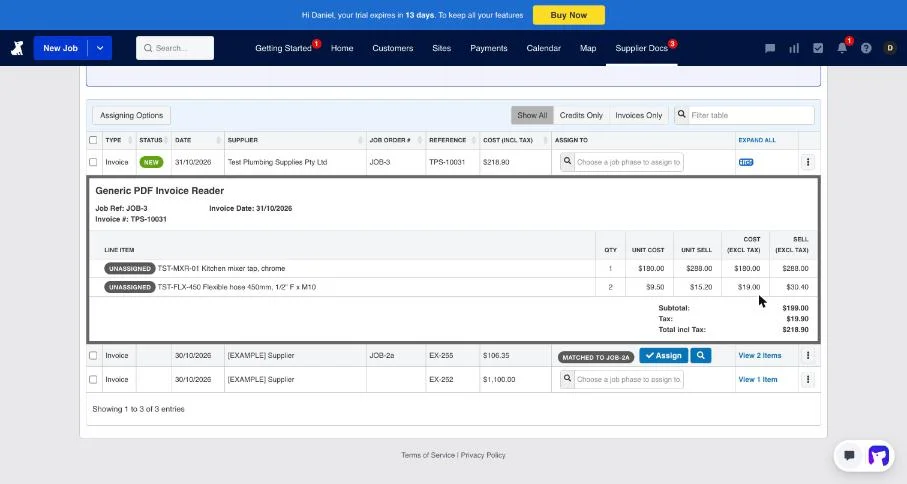
Fergus. We didn’t have a real Reece account, so we made a supplier invoice PDF for our job: a A$180 tap and two flexi hoses, A$218.90 including GST, with our job number as the reference. Fergus’s Generic PDF Invoice Reader read every field right in about 15 seconds: supplier, date, invoice number, job number, both lines with codes, quantities and prices, and the GST. It filled in sell prices at a 60% markup, and putting it on the job was one click. The job’s profit updated straight away.
It didn’t match itself to the job, though, even though it had read the job number. We think that’s because we’d already invoiced the job, and Fergus warned that costs added after invoicing won’t be back-costed correctly.
ServiceM8. We didn’t test its supplier invoice import, so we can’t compare the two side by side yet. ServiceM8’s help says emailed PDF invoices are read and attached to the job whose number is quoted as the purchase order number.
Mobile apps on site
ServiceM8 works fully offline and syncs later. Since ServiceM8 15 (September 2026) Android has a full app; before that, Android users got a cut-down “Lite” version, and some comparison pages still say Android crews should pick Fergus for that reason. Four features remain iPhone-only (Room Scan, diagrams, PDF editing, automatic photo tagging).
Fergus Go queues time entries, notes and photos offline since August 2026; quotes and invoices need signal. In our test that worked on a job we already had open, but when we reopened the app with no signal it couldn’t show any jobs. Its status board, which shows every job’s stage at a glance, is well liked.
| App rating | ServiceM8 | Fergus |
|---|---|---|
| Apple App Store (AU) | 4.54 (5,564) | 4.55 (564) |
| Google Play | 3.76 (737) | 4.42 (866) |
| Xero App Store (AU) | 4.56 (351) | 4.41 (79) |
On Android, Fergus users are happier. On iPhone, they’re level.
The same job in both apps
We quoted, booked, ran and invoiced the same A$449.90 job (a new kitchen mixer tap) in each.
| ServiceM8 | Fergus | |
|---|---|---|
| Building the quote | About 1½ minutes | About 3 minutes, including emailing it |
| GST on the first quote | No, until we added a 10% rate | Yes |
| Booking | Suggests the earliest free slot | Draw the time on the person’s row |
| “On my way” text | One tap, with an arrival estimate and tracking link | None: the message button opens a blank text |
| Time on the job | Recorded by GPS check-in and check-out | Start and stop a timer |
| Customer signature | Full-screen pad on the job | A Job Sign Off certificate |
| Invoice | From the phone after Job Complete | About a minute from the quote on the web; on the phone it showed an error but went through |
| What the customer’s invoice shows | Each line | One combined line unless you split it |
ServiceM8 was quicker on the phone and did more for the customer without being asked. Fergus had the better setup: GST, labour rate and your ABN on the quote were right from the start. In Fergus, stop the timer before you invoice on site: we invoiced with it running and the same time was logged twice.
Losing signal. Fergus kept a note, a photo and a running timer on a job we had open, and they all synced later. Reopened with no signal, it couldn’t show any jobs. We haven’t tested ServiceM8 offline yet.
Job costing and reporting
Fergus pulls overheads and cost of sales from Xero into its business performance dashboard, so you see job margins and business profit together. ServiceM8 has job costing and profitability on Premium (A$149) and a paid Advanced Reporting Pack. If margins are why you’re choosing, Fergus gets you there on a cheaper plan.
Xero integration compared
Both send invoices to Xero on approval and mark them paid when the payment is reconciled. ServiceM8 also syncs customers and items both ways every 30 minutes, and has add-ons for tracking categories and payroll shift times. Fergus has no Xero Payroll timesheet sync. See job management software that works with Xero.
In our test:
- ServiceM8 connected to Xero’s demo company in one screen. An invoice was in Xero under a minute after approving it, and a part payment came back in under five minutes.
- Fergus wouldn’t connect to Xero’s demo company, so we used a Xero trial organisation. An invoice reached Xero in 15 seconds, with materials and labour on separate lines. A payment made in Xero still hadn’t shown in Fergus 13 minutes later, until we pressed Refresh Data.
Fergus vs ServiceM8 in New Zealand
Fergus is stronger in NZ: the entry plan is called Basic (from NZ$53), its supplier links go deeper (price books and purchase orders with Mico, J.A. Russell and Corys), and it’s named in more NZ job ads than ServiceM8 (10 to 2). ServiceM8 charges the same plan numbers in NZ dollars. Its NZ card fees run from 3.10% plus 30c on Free down to 2.49% on Premium, against 2.95% plus 30c on Fergus NZ.
Fergus or ServiceM8: which to pick
- ServiceM8: crews of three or more, high-volume service work, card payments, work out of range, or connecting other tools.
- Fergus: plumbers and electricians with one to ten people buying through Reece, Tradelink or the Rexel brands, who want margins front and centre, or NZ businesses.
For more options, see ServiceM8 alternatives, the Fergus review and the ServiceM8 review.
Our verdict for a three-person plumbing business. It comes down to materials. On Fergus Professional, three people pay A$231 a month ex GST, against A$71.82 on ServiceM8 Growing: about A$1,900 a year more. That’s worth it if you buy most of your materials on account from Reece, Tradelink or a Rexel brand, quote fixed prices and want to see each job’s margin. Fergus’s supplier invoice reading and job profit do that well. If your work is mostly call-outs, servicing and small jobs, start with ServiceM8. It’s cheaper, quicker on site, and the customer gets an “on the way” text.
Written by Dan Edwards
Dan sets up job management, call tracking and CRM systems for trade businesses. More about Dan.